
Mobile app animations enhance user experience by making interactions smoother and more intuitive. However, achieving smooth animations requires careful selection of techniques to maintain performance – especially at 60 frames per second (fps).
Here’s a quick breakdown of the most common animation methods:
- CSS Animations: Simple and efficient, these run on the compositor thread. Best for basic transitions like fades or slides. Avoid animating properties like
widthortopto prevent performance issues. - JavaScript Animations: Offer flexibility for complex, logic-driven effects but run on the main thread, which can cause lag if overused. Use
requestAnimationFrame()for better results. - Native Animations: iOS Core Animation and Android Property Animations leverage hardware acceleration for smooth, responsive effects. Ideal for physics-based or gesture-driven interactions.
- Third-Party Tools: Lottie and Rive simplify animation workflows by exporting pre-designed animations. While efficient, features like masks or high vertex counts can impact performance on lower-end devices.
Quick Comparison
| Technique | Performance | Complexity | Best For | Limitations |
|---|---|---|---|---|
| CSS Animations | High (GPU-based) | Easy | Basic transitions | Limited logic and interactivity |
| JavaScript | Medium | Moderate | Complex, event-driven effects | Main-thread bottlenecks |
| Native | Highest | High | Gesture-driven or physics-based | Platform-specific expertise needed |
| Third-Party | High (Optimized) | Low/Moderate | Pre-designed, cross-platform | May lack platform-specific tuning |
Key Takeaway
Always prioritize animating properties like transform and opacity for smoother performance. Test animations on a range of devices to ensure consistent results, and choose the right method based on your app’s needs – whether it’s simplicity, flexibility, or high performance.
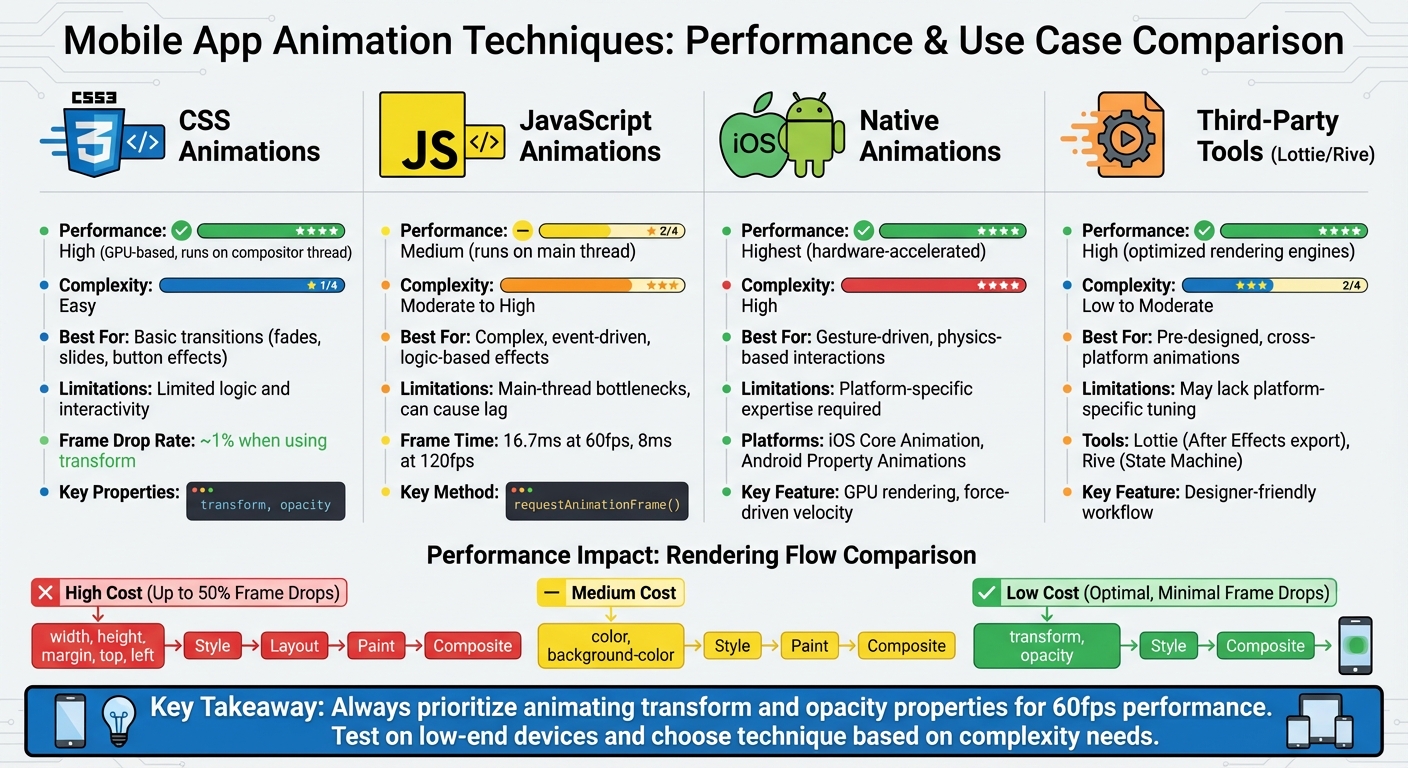
Mobile App Animation Techniques Performance Comparison Chart
Complete Guide to UI Animation and Tools!

1. CSS Animations
When it comes to mobile apps, smooth and efficient animations are a must. CSS animations stand out for their speed and simplicity – provided they’re optimized correctly. These animations operate on the compositor thread, separate from JavaScript and layout calculations, which helps improve performance. As Paul Lewis and Sam Thorogood from web.dev explain:
“CSS-based animations, and Web Animations where supported natively, are typically handled on a thread known as the ‘compositor thread’. This is different from the browser’s ‘main thread’, where styling, layout, painting, and JavaScript are executed.”
Performance Impact
To achieve top-notch performance, stick to animating transform and opacity. These properties can be handled by the GPU during the composite stage, avoiding costly layout and paint operations. On the other hand, animating properties like width, height, top, or left forces the browser to recalculate geometry, which can significantly slow things down on mobile devices.
Here’s why this matters: tests reveal that animations using top and left can drop up to 50% of frames, whereas using transform results in minimal frame drops – around 1%. At 60 frames per second, the browser has only 16.7 milliseconds per frame to execute scripts, recalculate styles, handle layout, and repaint the screen.
| Property Type | Examples | Rendering Steps Triggered | Performance Cost |
|---|---|---|---|
| Geometry/Layout | width, height, margin, top, left |
Style → Layout → Paint → Composite | High |
| Paint Only | color, background-color, visibility |
Style → Paint → Composite | Medium |
| Composite Only | transform, opacity |
Style → Composite | Low (Optimized) |
These performance advantages make CSS animations not only efficient but also easy to implement.
Ease of Implementation
CSS animations are simple to set up using @keyframes and timing functions, making them perfect for common transitions like button effects, fade-ins, or slide animations. To further enhance performance, you can use the will-change property to signal which elements will animate. This allows the browser to prepare ahead of time, but it’s important to use this feature sparingly to avoid draining device memory. For older mobile browsers, adding transform: translateZ(0) can also help by placing the element on its own GPU layer.
This ease of use makes CSS animations a favorite for developers, especially when combined with platform-specific enhancements.
Platform-Specific Optimizations
Both iOS (WebKit) and Android (Chromium) browsers come with built-in optimizations for CSS animations. For example, they automatically create new layers for elements animated with opacity. Additionally, these browsers adjust frame drops dynamically to maintain responsiveness. Keeping animations between 300ms and 500ms is ideal for ensuring UI interactions feel snappy and natural. Another thoughtful addition is the prefers-reduced-motion media query, which respects users who have motion-reduction settings enabled on their devices.
Flexibility and Customization
While CSS animations are great for predefined sequences, they’re less versatile compared to JavaScript when it comes to handling complex logic, real-time user input, or physics-based movements. However, modern CSS has stepped up its game by supporting discrete property animations like display, which makes smooth entry and exit effects possible. Additionally, CSS events like animationstart and animationend allow developers to blend CSS animations with JavaScript for hybrid solutions.
CSS animations strike a balance between simplicity and performance, making them a powerful tool for creating polished, responsive mobile app experiences.
2. JavaScript Animations
JavaScript animations bring a lot of flexibility to mobile applications, but they come with a performance cost. Unlike CSS animations – which often run on the compositor thread – JavaScript animations operate on the browser’s main thread. This is the same thread responsible for tasks like style calculations, layout updates, painting, and application logic. While JavaScript animations provide more control than CSS, they also increase the risk of performance issues. As Motion.dev puts it:
“The JavaScript code will always run on the main JS thread. This means if your app is running other JS code at the same time, your animation code could be blocked from running at all. This will result in choppy animations.”
Performance Impact
Smooth frame rendering is essential for a good user experience, and JavaScript animations can face challenges due to the main thread bottleneck. When your app is busy processing data or rendering complex UI elements, animations may lag or stutter because everything competes for the same limited time – just 16.7 milliseconds per frame at 60fps. On devices with 120fps, the time shrinks even further to 8 milliseconds.
To maintain smooth animations, always use requestAnimationFrame() rather than setTimeout or setInterval. Chloe Hwang highlights that requestAnimationFrame “guarantees the callback will run at the start of every frame, syncing our animation to the device’s refresh rate”. It also conserves CPU resources by pausing in background tabs. Additionally, focus on animating properties like transform and opacity, which avoid costly layout recalculations.
Flexibility and Customization
JavaScript shines when it comes to creating dynamic, interactive animations that go beyond what CSS can handle. Modern tools like React Native‘s Reanimated 3 use worklets – small JavaScript functions that run directly on the native UI thread. This approach bypasses the JavaScript bridge, allowing for smooth, natural interactions such as velocity-based animations that mimic the momentum of a user’s gestures.
JavaScript also supports intricate animation sequences with methods like withSequence, withDelay, and withRepeat, giving developers precise control over timing. The React Native documentation points out that the Animated API is “designed to be fully serializable so that animations can be run in a high performance way, independent of the normal JavaScript event loop”.
Platform-Specific Optimizations
Fine-tuning animations for specific platforms can further improve performance. On iOS, Core Animation – as noted in the Apple Developer Documentation – offloads much of the rendering to the device’s graphics hardware, speeding up the process. For Android, always enable useNativeDriver: true for supported properties. This ensures animations are serialized and executed on the UI thread, reducing strain on the main thread.
When working with 3D transforms like rotateX or rotateY, remember to include a perspective value in your style object. Without it, the animation won’t render. For React Native layout animations on Android, you’ll need to enable them explicitly by calling UIManager.setLayoutAnimationEnabledExperimental(true).
Lastly, avoid animating properties like width or height directly, as they trigger expensive layout recalculations. Instead, use transformations like transform: [{ scaleY: 2 }] to keep frame rates steady.
3. Native Animations (iOS/Android)
Native animation frameworks deliver top-tier performance by tapping into the hardware-accelerated rendering systems of iOS and Android. On iOS, this is achieved through Core Animation, while Android relies on Property Animations. These frameworks are deeply integrated into their respective operating systems, ensuring smooth and responsive animations by taking full advantage of hardware acceleration.
Performance Impact
iOS’s Core Animation works by compositing view layers instead of redrawing them repeatedly. It captures view content into bitmaps – referred to as layers – which are then processed directly by the device’s GPU. As noted in Apple Developer Documentation:
“This automatic graphics acceleration results in high frame rates and smooth animations without burdening the CPU and slowing down your app.”
On the other hand, Android’s Property Animation system continuously updates View properties and redraws them. Developers are encouraged to use physics-based animations, such as spring or fling, which create more natural motion by maintaining momentum and handling interruptions gracefully. These animations apply forces to existing velocities, ensuring fluid transitions to new states.
Both native frameworks are designed to maximize performance by tailoring their optimizations to the specific capabilities of their platforms.
Platform-Specific Optimizations
Each platform offers unique techniques to improve animation performance. On iOS, optimizing animations involves strategies like setting the opaque property to YES whenever possible, which eliminates the need for alpha channel blending. Similarly, defining a shadowPath when adding shadows avoids the overhead of real-time shadow shape calculations. For more demanding tasks, asynchronous drawing can be used to shift work off the main thread.
For Android, developers working with Jetpack Compose should focus on running animations during the draw phase instead of during layout or composition. Using tools like Modifier.graphicsLayer { ... } or the lambda version of modifiers, such as Modifier.offset { ... }, can bypass recomposition entirely. For color transitions, animateColorAsState is more efficient than Modifier.background(). Likewise, for shadows, Modifier.graphicsLayer { shadowElevation = ... } performs better than Modifier.shadow().
| Feature | iOS (Core Animation) | Android (Property Animation) |
|---|---|---|
| Primary Mechanism | Layer-based compositing (GPU) | Property updates and redrawing |
| Default Animation Type | Implicit (on property change) | Explicit (via API calls) |
| Interruption Handling | Managed via presentation layer | Physics-based force/velocity |
| Performance Focus | GPU acceleration & bitmap caching | Smooth transitions & physics |
Flexibility and Customization
Beyond performance, native frameworks provide developers with a wealth of customization options. iOS’s Core Animation allows for precise control using CALayer, enabling 3D transformations, Z-order adjustments, and custom shadow or border configurations. Animations can also be chained using completion handlers or nested to override default timing curves.
Android offers similar flexibility through its AnimationSpec parameter, which lets developers choose between physics-based animations (like spring) and duration-based options (such as tween or keyframes). For more intricate transitions, Android’s MotionLayout enables fully declarative transitions defined in XML, complete with keyframes and touch-sensitive progress tracking:
“MotionLayout is fully declarative, meaning you can describe any transitions in XML, no matter how complex.”
Additionally, Android supports animating custom data types by implementing a TwoWayConverter to map objects to an AnimationVector. Meanwhile, iOS offers a variety of standard animatable properties, including frame, bounds, center, transform, alpha, and backgroundColor.
sbb-itb-539ae66
4. Third-Party Tools (Lottie, Rive)
Third-party animation tools like Lottie and Rive have become go-to options for creating and exporting animations that are both visually appealing and lightweight. These tools are especially popular in mobile app development because they save developers from coding every animation detail manually, all while delivering high-quality visuals.
Performance Impact
Lottie and Rive take different approaches to rendering, which influences their performance. Lottie relies on platform-native frameworks – Core Animation on iOS and Canvas with hardware acceleration on Android. On iOS, the rendering is handled by a separate system process called the “Render Server” (backboardd). This means tools like Xcode may not fully capture the CPU and memory impact unless you monitor that specific process.
Rive, on the other hand, uses a custom renderer that directly taps into low-level APIs like Metal on Apple devices. This allows Rive to have more precise control over performance. For example, it can pause inactive animations to save CPU resources.
Both tools aim to meet the 60 FPS standard, meaning each frame must be rendered within 16.67ms. However, each has its challenges. For Lottie, masks and mattes are the main performance bottlenecks on Android. For Rive, layer blend modes on the web and high vertex counts can slow things down, especially on older devices. Testing animations on low-end devices is crucial, as effects that work smoothly on high-end phones may not perform well on hardware with limited resources.
These performance differences set the stage for understanding how these tools handle implementation and platform-specific optimizations.
Ease of Implementation
The way these tools integrate into development workflows can significantly affect efficiency. One key difference lies in how they manage interactivity and logic. Lottie animations are generally linear, requiring developers to write code to control playback or trigger specific animation segments. Rive, however, uses a State Machine that lets designers embed interactive logic directly into the animation file. This reduces the amount of coding developers need to do.
Rive also offers features like Data Binding, which allows engineers to push data into animations while designers link that data to UI elements such as text or colors within the Rive editor. Additionally, Rive supports in-editor scripting with Luau, enabling designers to handle complex logic within the tool itself rather than relying on app code. Kurt Hartfelder from Duolingo highlighted the impact of Rive’s State Machine:
“Rive’s State Machine is a game changer… The State Machine helps us scale our work and bridge the animator-developer gap in ways that were previously inaccessible.”
Platform-Specific Optimizations
Both tools include platform-specific features to improve animation performance. Lottie leverages Core Animation on iOS, offloading rendering to the backboardd process. On Android, it supports both hardware and software acceleration, with hardware mode generally being faster. However, certain features like anti-aliasing (API 16+) and stroke caps (API 19+) depend on specific API levels. Lottie also automatically converts After Effects pixel values into density-independent units – points on iOS and dp on Android – ensuring consistent sizing across devices.
Rive takes a different approach by using Metal APIs directly on Apple devices, allowing for granular control over CPU and memory usage. Its runtime automatically pauses when no active animations or blend states are running. Rive also uses “Solos”, a feature that disables rendering for inactive objects, making it more efficient than animating opacity since deactivated elements aren’t computed or rendered.
| Feature | Lottie | Rive |
|---|---|---|
| Primary Rendering Tech | Core Animation (iOS) / Canvas (Android) | Custom Renderer / Metal (Apple) |
| Performance Bottlenecks | Masks, Mattes, and Merge Paths | Layer Blend Modes (Web), High Vertex Counts |
| Optimization Strategy | Hardware Acceleration (API 16+) | State Machine Pausing, Solos, Caching |
| Resource Visibility | Split between App and Render Server | Primarily within the App Process |
If you’re using Lottie in React Native, always set useNativeDriver: true to ensure animations run on the UI thread, avoiding jank caused by heavy JavaScript tasks. For Rive, cache .riv files when reusing animations to avoid redundant parsing and decoding. Also, pause animations programmatically when they scroll offscreen to conserve resources.
Flexibility and Customization
Rive offers dynamic runtime features, such as loading and replacing fonts, images, and audio, which help reduce the app’s initial size. This flexibility is particularly useful for apps that need to adapt animations based on user preferences or device specs. Rive also provides a converter for migrating Lottie JSON files, though recreating animations directly in Rive often results in smaller file sizes due to its use of bones and constraints.
Both tools support multiple platforms. Rive offers official runtimes for iOS, Android, React Native, Flutter, Unity, and Unreal Engine. Its renderer can handle vectors at 120 FPS with excellent quality, and its runtimes are open-source under the MIT License. For optimizing assets, Rive recommends using WebP for raster images to achieve smaller file sizes and better performance.
Pros and Cons
Now that we’ve explored performance and flexibility, let’s weigh the pros and cons of different animation approaches. Each method has its strengths and limitations, making it important to choose the right tool for the job.
CSS animations are a go-to choice for simplicity and efficiency. They run on the compositor thread, ensuring smooth performance even when the main thread is busy with heavy JavaScript tasks. However, they come with limited flexibility, as they primarily support properties like transform and opacity to maintain optimal performance.
JavaScript animations, on the other hand, offer unmatched control for crafting intricate, event-driven effects. But they operate on the main thread, which can lead to dropped frames if other processes are competing for resources. As Motion.dev explains:
“The JavaScript code will always run on the main JS thread. This means if your app is running other JS code at the same time, your animation code could be blocked from running at all”.
Native animations stand out for their exceptional performance and deep integration with operating systems. They leverage GPU hardware acceleration and handle interruptions gracefully. For instance, Android’s spring animations adjust velocity dynamically when targets change. The trade-off? A steeper learning curve, as mastering native animations often requires familiarity with frameworks like Jetpack Compose or SwiftUI.
Third-party tools like Lottie and Rive streamline workflows by allowing direct animation exports. They also deliver strong performance with their optimized rendering engines. While they simplify the process, they may not always provide the same level of platform-specific tuning as native solutions.
Here’s a quick comparison of these techniques:
| Technique | Performance | Implementation Difficulty | Platform Optimization | Customization Options |
|---|---|---|---|---|
| CSS | High (Off-main-thread) | Low (Declarative) | High (Browser-level) | Low (Limited logic) |
| JavaScript | Medium/High (Main-thread) | Medium/High (Imperative) | Low (Main-thread bound) | Very High (Full logic) |
| Native | Highest (Hardware-level) | High (Platform-specific) | Highest (OS-integrated) | High (Physics-based) |
| Third-Party | High (Optimized engines) | Low/Medium (Workflow-based) | Medium/High | High (Pre-built effects) |
When animating, keep in mind that properties like width, height, or top can trigger costly layout recalculations, while transform and opacity stay within the more efficient composite stage. Always test your animations on low-end devices, as performance on desktop doesn’t always reflect mobile results. Use will-change cautiously to avoid unnecessary memory usage. For native mobile apps, physics-based animations like spring are often better suited for user-driven interactions than duration-based tween animations, as they adapt more fluidly to interruptions.
Conclusion
Choosing the right animation technique comes down to balancing performance, complexity, and platform requirements. For simple web transitions – like hover effects or fade-ins – CSS animations are your best bet. They run on the compositor thread, ensuring smooth performance with minimal code overhead. However, when dealing with more intricate, logic-driven interactions on the web, JavaScript animations offer the flexibility needed, though they operate on the main thread and can impact performance.
When it comes to native mobile apps, the focus shifts to physics-based animations for creating smooth, natural motion. On iOS, Core Animation uses GPU hardware acceleration to deliver high frame rates without overloading the CPU. On Android, Jetpack Compose employs force-driven velocity tracking to achieve fluid, responsive interactions. While these techniques demand a higher level of technical expertise, they are critical for delivering the polished user experiences mobile users expect.
For React Native developers, enabling the useNativeDriver for properties like opacity and transform allows animation instructions to bypass the main thread, sending them directly to the UI thread. This approach aligns well with cross-platform workflows, where tools like Lottie can simplify the process. Lottie ensures consistent design and strong performance using optimized rendering engines, making it an excellent choice for cross-platform projects.
To maximize performance, always animate properties like transform and opacity. These leverage the compositor stage, avoiding expensive layout recalculations and keeping frame times within the critical 16.67 ms window (or 8.33 ms for 120 fps).
Finally, test your animations on actual devices and regularly profile them using performance tools. Keep an eye on dropped frames and aim for a hitch time ratio under 5 ms per second to ensure a seamless user experience.
FAQs
What are the performance differences between CSS and JavaScript animations?
CSS animations tend to offer superior performance compared to JavaScript animations because they run on the browser’s compositor thread. This thread is specifically designed to handle animations and transitions efficiently, reducing the workload on the main thread. The result? Smoother animations and a more responsive user experience.
On the other hand, JavaScript animations usually operate on the main thread, which is also responsible for tasks like handling user interactions and rendering the page. Even when leveraging methods like requestAnimationFrame, JavaScript animations can add extra processing demands, particularly for intricate animations or on devices with limited resources. For simpler effects where performance is key, CSS animations are often the smarter choice.
What are the best practices for creating smooth animations in mobile apps?
Smooth animations are an essential part of creating a polished mobile experience. Users have come to expect fluid motion, typically at around 60 frames per second (FPS). To meet this standard, aim to keep the processing time for each frame under 16.7 milliseconds. Avoid heavy tasks like complex layout recalculations or running long scripts during animations, as these can cause noticeable lag.
For the best results, focus on animating compositor-friendly properties like transform and opacity. These properties bypass costly layout and paint steps, making animations more efficient. To further enhance performance, use the will-change property – it preps elements for animation and ensures hardware acceleration is utilized. Keep animations short, use natural easing functions for a more lifelike feel, and always test your work on actual devices to gauge real-world performance.
If you’re working with AppInstitute‘s no-code app builder, you’re in luck – these best practices are already baked into the platform. It automatically optimizes animations by leveraging transform and opacity, applies will-change for smoother transitions, and generates high-performance native code for iOS and Android. By sticking to these principles, you’ll deliver animations that feel fluid and responsive across all devices.
How do tools like Lottie and Rive affect the performance of mobile apps?
Tools like Lottie and Rive can play a big role in improving app performance by replacing bulky bitmap assets with lightweight vector animations. This switch not only trims down file sizes but also enhances the overall animation quality. That said, their effectiveness largely depends on how they’re used.
Lottie is known for its efficiency, but if not optimized correctly, it can sometimes cause issues like lower frame rates or bloated app bundle sizes. In contrast, Rive stands out with its built-in state machine and custom rendering engine, which often deliver smoother animations and more compact file sizes. This makes Rive an excellent pick for apps requiring highly interactive or complex animations.
Related Blog Posts
- Improving App Responsiveness: Key Metrics To Track
- Best Practices for Mobile App Navigation Menus
- Top Cross-Platform Tools for Compatibility Solutions
- Best Practices for Typography in No-Code Apps
Last Updated on January 22, 2026 by Becky Halls
0 thoughts on “Custom Animation Techniques for Mobile Apps”