It is 9pm on a Tuesday. The last class finished two hours ago, your feet still ache, and instead of collapsing on the sofa you are hunched over your phone replying to the same three questions you answered yesterday. “What time is Grade 3 tap again?” “Has Saturday street been cancelled because of the weather?” “Can Lily switch from the Thursday class to the Monday one?” Multiply that by forty families and you have your evening gone… And this is why we have created the dance studio app template!
Running a dance studio is a labour of love, but nobody warned you it came with a second job as a full-time receptionist, a WhatsApp moderator and a lost-property department. The good news is that the admin side does not have to live rent-free in your head. A dedicated dance studio app can take most of it off your plate, keep your classes full, and make show season feel less like a fire drill. Let us walk through what one actually does, and whether it is worth it for a studio your size.
Why is term-time admin eating all your evenings?
Most studios run on a patchwork of tools. Timetables live on a Facebook page. Fees get chased over text. Costume sizes end up scribbled on the back of a register. Cancellations go out to a group chat that half the parents have muted. It works, sort of, until it does not, and then you are the one firefighting at 9pm.
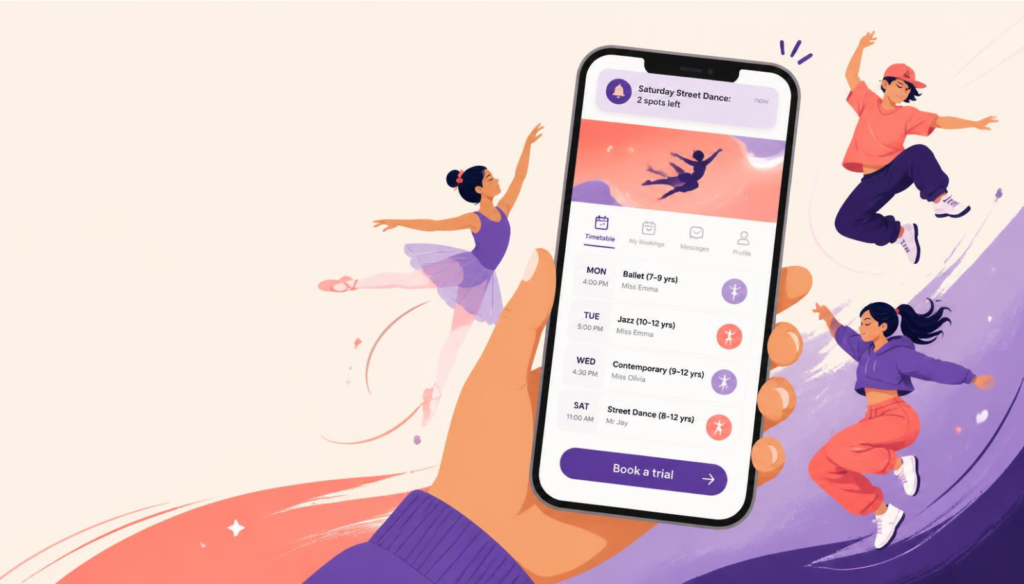
The problem is not that you are disorganised. It is that your information is scattered across six places, and parents have to go hunting for it. When they cannot find it, they ask you. An app pulls everything into one tidy home screen on the parent’s phone: the timetable, the fees, the news, the show dates, the kit list, all of it in one place they can actually find. Fewer “quick questions” for you means more actual rest.
What can a dance studio app actually do?
Think of it as your studio in someone’s pocket. A typical setup includes a live class timetable that updates the moment you change it, a news feed for announcements, push notifications for anything urgent, a booking system for trials and workshops, and a payments link for term fees and costumes. Parents get their child’s schedule, photos from the last showcase, and a one-tap way to book or pay. You get a single dashboard and a lot fewer notifications of your own.
The part owners love most is how it kills repetitive questions. Put the autumn term timetable in the app once and you stop typing it out forty times. Add a half-term workshop and parents can book it right there. It is the difference between answering and publishing.
How does an app help fill your classes and your waitlist?
Empty spots in a Monday ballet class are lost income every single week, and they rarely fill themselves. An app gives you two quick wins. First, trial bookings: new families can grab a taster slot in a few taps instead of emailing and waiting for you to reply (by which point they have booked with the studio down the road). If you already use a scheduling tool like Acuity Scheduling, Square Appointments, Vagaro or BookedIn, you can plug it straight into the app so bookings flow into the calendar you already trust.
Second, it turns your current families into your best marketing. Parents who love your studio will happily tell other parents, especially when sharing a class is as easy as tapping “invite a friend”. Add a simple referral nudge or a loyalty perk for siblings and you have a growth engine that runs without you lifting a finger. For context on how big this market is, kids activity class participation in the UK has kept climbing, and the studios winning those families are the ones making it effortless to sign up.
Can an app make recital and show season less chaotic?
Show season is magic for the kids and a logistical nightmare for you. Rehearsal schedules change, costume deadlines loom, ticket sales need chasing, and every parent wants to know where to stand with their phone. This is where an app earns its keep.
Drop the rehearsal timetable into the app and push a reminder the night before each run-through. Sell show tickets through an Eventbrite link right inside the app so you are not handling cash in a draughty foyer. Post the costume list with photos so nobody turns up with the wrong colour tights. When the dress rehearsal time shifts (and it always does), one push notification reaches every family at once, rather than you praying they all check the group chat.
What about costume orders, term fees and awkward money chats?
Chasing payments is the bit most studio owners dread, because it feels personal. An app makes money quiet and automatic. Link Stripe for card payments and parents can settle term fees, workshop costs and costume orders straight from their phone, with a gentle automated reminder doing the nudging so you do not have to. No more “I’ll bring it next week” times thirty.
For costumes specifically, you can take sizes and payment in one go through a simple in-app form, which beats a soggy sign-up sheet by the studio door. The result is you spend less of your week being the debt collector and more of it doing the thing you actually trained for.
How do you get parents to actually read your messages?
Here is the thing about group chats and email: most of it goes unread. Email open rates hover in the low twenties at best, and a muted WhatsApp group is a message graveyard. Push notifications are a different story. According to recent push notification benchmarks, they consistently outperform email for reach and engagement, landing right on the lock screen where parents will see them.
With AppBuild.diy that matters even more, because push notifications are unlimited and completely free. No per-message fees, no credit top-ups, no watching a counter. Send a weather cancellation, a “doors open at 6pm” reminder, or a “last two spots in Saturday street” nudge as often as you need. When reaching every family costs nothing, you stop rationing your messages and start actually communicating.
“Studio owners are not short of passion, they are short of hours. Every feature we build for niches like this is really about handing those hours back. If an app saves you two evenings a week, it has already paid for itself.” Ian, AppBuild.diy by AppInstitute
Isn’t building an app expensive and slow?
This is the belief that keeps most studios on the sidelines, and it is years out of date. You do not need a developer, a five-figure budget or a six-month wait. With AppBuild.diy you build your own app with no code, and it goes live in about fifteen minutes. From a single build you get a fully native iOS and Android app published to the Apple App Store and Google Play, plus a web app (PWA) for anyone who would rather not download. One build, every platform, your studio’s name on the icon.
That last part matters. Being in the App Store and on Google Play under your own brand makes a small studio look seriously professional to a new parent comparing their options. It says you are established, you are trustworthy, and you take their child’s lessons as seriously as they do.
“I always tell small business owners to picture their logo on a parent’s home screen. That little icon sits there all week between lessons. It is the cheapest, most constant reminder of your studio that money can buy, and with AppBuild it is genuinely affordable.” Becky, AppBuild.diy by AppInstitute
Is it right for a studio your size?
If you teach more than a couple of classes a week and you are tired of being the human timetable, the answer is almost certainly yes. Solo teachers, church-hall ballet schools, and multi-studio academies all benefit, because the core problem (scattered info and endless questions) is the same at every size. Start simple with a timetable, news feed and push notifications, then add bookings and payments as you grow.
“Do not wait until you have the perfect plan. Build a basic version this week, get it in your parents’ hands, and improve it as you go. A live app that saves you time today beats a perfect one that never ships.” David, AppBuild.diy by AppInstitute
Does My Dance Studio Need Its Own App – FAQ
How long does it really take to build a dance studio app?
With AppBuild.diy, your first working version can be live in around fifteen minutes. Polishing branding, classes and content takes a bit longer, but you will have something real to show parents the same day.
Do I need any technical or coding skills?
None at all. The builder is fully no-code and no developers are required. If you can set up a social media page, you can build your app.
Will it work on both iPhone and Android?
Yes. One build gives you native apps for both the Apple App Store and Google Play, plus a web app (PWA) for anyone who prefers not to install anything.
Can parents book trials and pay fees through the app?
Absolutely. You can connect scheduling tools like Acuity, Square Appointments, Vagaro or BookedIn for bookings, and Stripe for payments, so trials, workshops, term fees and costumes are all handled in one place.
Are push notifications really free?
Yes, unlimited and free, with no per-message charges. Send as many class reminders, cancellations and offers as you like.
Ready to lose the 9pm admin?
Your evenings are worth more than answering the same three questions on repeat. A dance studio app puts your timetable, your bookings, your payments and your announcements in one place parents will actually use, and frees you up to focus on the dancing.
Build yours in about fifteen minutes, no code and no developers, and get it live on the App Store and Google Play under your own name. Start building your dance studio app for free at AppBuild.diy and give yourself your Tuesday nights back.
Happy building,
David, CEO of AppBuild.diy by AppInstitute
Last Updated on October 2, 2026 by Becky Halls
0 thoughts on “Does My Dance Studio Need Its Own App? A Straight-Talking Guide for Studio Owners”