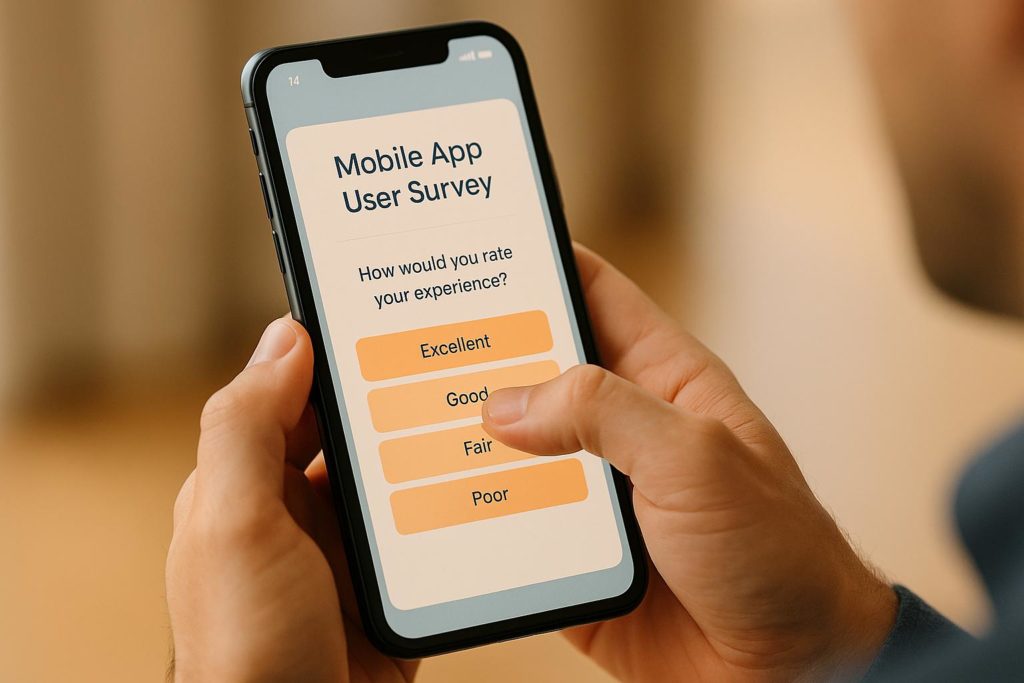
Mobile app user surveys are a powerful way to understand why your users behave the way they do. While analytics show you what’s happening – like where users drop off or how long they stay – surveys reveal the reasons behind those behaviors. Here’s what you need to know:
- What They Are: In-app surveys collect real-time feedback tied to specific user actions, like completing a purchase or trying a new feature.
- Why They Matter: Surveys help identify issues like confusing interfaces or unmet expectations, allowing you to make data-driven improvements to boost retention, engagement, and revenue.
- Types of Surveys: Common ones include NPS (Net Promoter Score), CSAT (Customer Satisfaction), CES (Customer Effort Score), onboarding surveys, and churn/exit surveys.
- How to Use Them: Plan surveys with clear goals, segment your audience, and time them carefully to avoid interrupting users. Keep them short and mobile-friendly.
Mobile app surveys: Live demo

Planning Your Mobile App Surveys
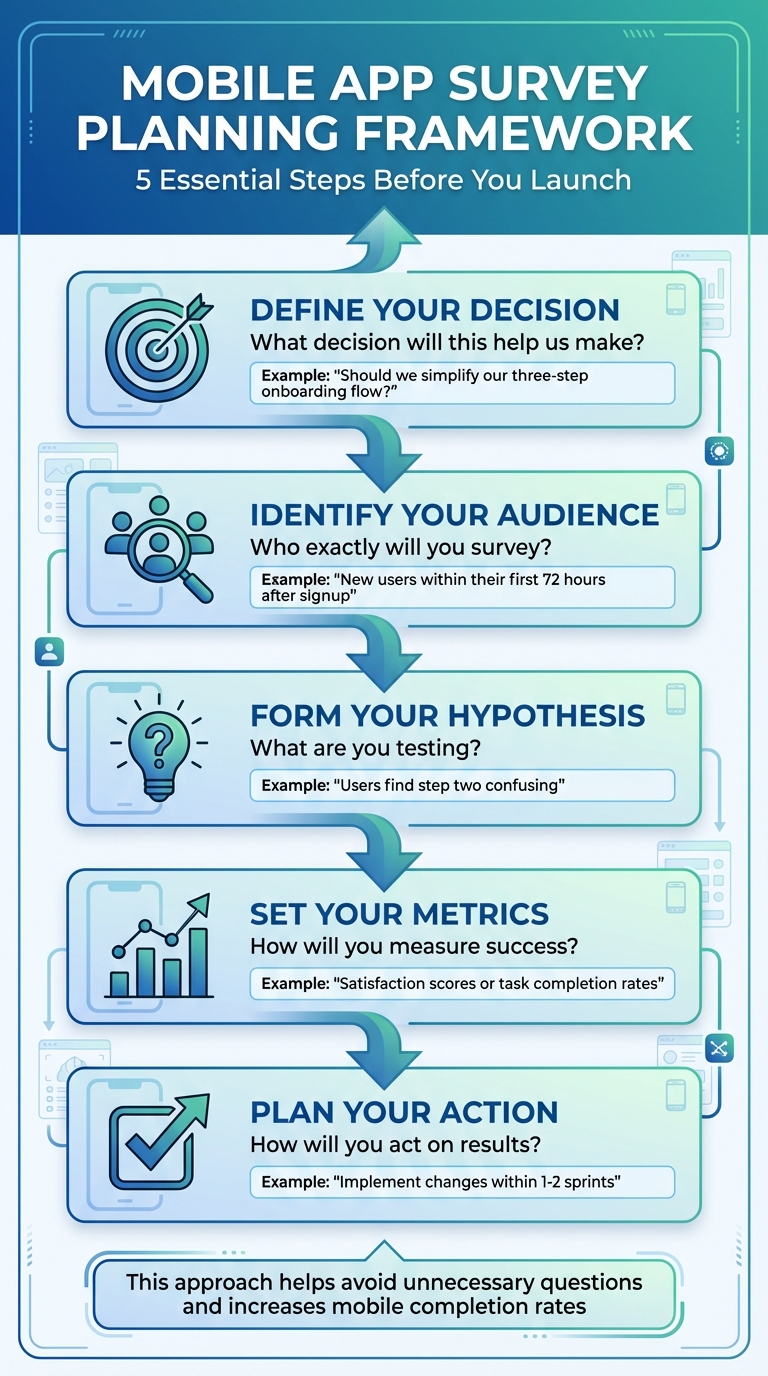
Mobile App Survey Planning Framework: 5-Step Process
Creating a successful survey begins with a straightforward question: What decision will this help us make? Before drafting your questions, take the time to outline a survey brief. This should include: (1) The specific decision you aim to inform (e.g., “Should we simplify our three-step onboarding flow?”), (2) The exact audience you’ll survey (e.g., “new users within their first 72 hours after signup”), (3) The hypotheses you’re testing (e.g., “users find step two confusing”), (4) The metrics you’ll measure (like satisfaction scores or task completion rates), and (5) How you’ll act on the results within a set timeframe. This approach helps you avoid unnecessary questions, which can lower completion rates on mobile devices.
Setting Clear Research Goals
Tie your business goals directly to measurable outcomes. For example, if your goal is to reduce 90-day churn by 10%, your survey objectives might focus on uncovering the top three reasons for early drop-off and evaluating user satisfaction with onboarding and core features. Think of it as a chain: business goal → product metric → survey objective → concise questions. This structure ensures you’re gathering insights that can inform actionable changes. Focus on goals that can lead to tangible design or messaging updates within one or two sprints, and clearly document which team – whether product, marketing, or support – will act on the survey findings.
Identifying and Segmenting Your Audience
Segmenting your audience by lifecycle stage, behavior, or profile is key. The way you segment users will shape the questions you ask. For example, a fintech app targeting new U.S. users who’ve completed their first $50+ transaction might send a quick satisfaction survey right after checkout to identify ways to streamline the payment process. On the other hand, a fitness app could focus on lifecycle segmentation – sending in-app onboarding surveys to users in their first week, while emailing lapsed users to understand why they stopped using the app. Behavioral filters, like targeting users who haven’t tried a particular feature in seven days, can help pinpoint reasons for low adoption and spark engagement ideas.
| User Segment | Example Survey Trigger | Sample Question |
|---|---|---|
| First-time users | Onboarding completion | “What motivated you to start your fitness journey?” |
| Post-transaction | After first payment | “How easy was the transaction and security?” |
| Long-term users | Feature exploration | “What’s one feature we could add?” |
Survey Timing and Distribution Methods
Timing is everything when it comes to surveys. Aim to collect feedback when the experience is still fresh but avoid interrupting the user. For instance, an onboarding survey works best after the user completes the initial setup or a key action. A feature survey might be triggered after the second or third use of a new feature. For transactional feedback, send a survey immediately after a purchase, booking, or support interaction.
When it comes to distribution, in-app surveys are ideal for gathering contextual feedback on specific tasks – users can respond without leaving the app, which boosts participation and captures real-time impressions. Use push notifications sparingly for very brief polls or to re-engage inactive users, but be mindful of notification fatigue. Reserve email surveys for longer questionnaires or for reaching churned users who no longer open the app regularly. For example, a retail app might ask for an in-app rating after an order is delivered and only resort to push notifications if the app hasn’t been opened within 48 hours. To prevent survey fatigue, set rules like “no more than one in-app survey per user every 30 days” and exclude users who’ve recently completed a survey from new campaigns.
Once you’ve established your survey plan and timing, the next step is designing surveys that engage mobile users effectively.
Designing Surveys for Mobile Devices
When creating surveys for mobile devices, the focus should be on simplicity, clarity, and ease of use. Mobile users face unique challenges – small screens, limited attention spans, and touch-based interactions. A survey that works well on a desktop might feel overwhelming or cluttered on a phone. To get meaningful feedback, every element of the survey should serve your research goal and make the process as seamless as possible.
Survey Design Best Practices
Keep it short. For in-app surveys, stick to 1–3 questions whenever possible. If you need to ask more, limit it to 5–7 questions and let users know upfront how long it will take (e.g., “This will take 90 seconds”).
Use a single-screen or one-question-per-screen format. Long scrolling pages can be distracting, so break the survey into smaller, focused sections. If multiple screens are necessary, include a progress indicator (e.g., “Question 2 of 4”) to reassure users and reduce drop-offs. Ensure each screen has a single, clear call-to-action button like “Next” or “Submit.” To keep users engaged, embed surveys directly within the app instead of redirecting them to a mobile browser – this helps maintain context and reduces abandonment rates.
Once the layout is optimized, the next step is crafting precise, effective questions.
Writing Clear Survey Questions
Write questions that are easy to read and understand, addressing only one idea at a time. Avoid jargon, overly complex wording, or biased phrasing. For example, instead of asking, “How amazing was our new checkout flow?” opt for something neutral like, “How easy or difficult was it to complete your checkout today?” with a 5-point scale ranging from “Very difficult” to “Very easy”.
Focus on specific behaviors rather than general opinions. For instance, “How satisfied are you with tracking your order in the app?” is actionable, while “How do you like our app?” is too vague. To dig deeper, follow up ratings with one targeted open-ended question, such as, “What made it easy or difficult?” This approach gathers valuable insights without overwhelming users with excessive typing. Use neutral response scales and always include options like “Not applicable” or “I’m not sure” to avoid forcing inaccurate answers.
Mobile UX Considerations
Design surveys with thumb-friendly interaction in mind. Place key buttons and answer choices in the lower half of the screen, where thumbs naturally rest, especially on larger devices. To prevent accidental taps, ensure clickable areas are at least 44×44 points. Use large, high-contrast fonts – 14–16 pt for body text – and leave enough space between options to minimize errors.
Minimize typing. Replace text fields with buttons, sliders, radio buttons, or pre-defined answer lists whenever possible. Typing on a mobile keyboard can be slow and frustrating, so limit open-ended questions to a single optional field at the end. Use skip logic to show only relevant questions based on prior responses – for example, if a user rates their experience 4 or 5 stars, skip questions about what went wrong.
Before launching, test your survey on actual iOS and Android devices across a variety of screen sizes commonly used in the U.S. This helps identify issues like small tap targets, text getting cut off, or keyboards blocking input fields. A little extra testing ensures a smoother experience for your users.
sbb-itb-539ae66
Deploying and Analyzing Your Surveys
Launching and Testing Your Surveys
Before rolling out your survey, it’s smart to test it with a small group of 10–50 users. This dry run helps you catch issues like buttons that are hard to tap, slow performance, or confusing questions. Fixing these early can improve completion rates by as much as 20–30%. Make sure to test on a variety of devices – iPhones, Android phones, and tablets – to ensure everything works smoothly across different screen sizes. Surveys that aren’t tested often see drop-off rates climb by 40–50%.
Once the survey is ready, use event-based triggers to send it out at just the right moment – like after a user completes onboarding, finishes a key task, or updates the app. To avoid overwhelming users, limit survey invites to one or two per month per user. Timing matters – a well-timed survey can boost response rates to 10–30% because users are more engaged when the experience is still fresh in their minds.
Analyzing Survey Data
After your pilot phase, dive into the data to turn feedback into actionable metrics. Start with the numbers: calculate your Net Promoter Score (NPS) by subtracting the percentage of Detractors (scores of 0–6) from Promoters (scores of 9–10). For mobile apps, an NPS of 50 or higher is considered excellent. Track Customer Satisfaction (CSAT) trends using a 1–5 scale, and break the data down by user segments to uncover patterns.
For open-ended feedback, use thematic analysis to group responses into categories like “UI bugs”, “feature requests”, or “slow performance.” Pay attention to recurring issues – if 35% of users mention slow load times or 20% report app crashes, those problems should jump to the top of your to-do list. Many tools also include natural language processing features, which can help identify sentiment and create word clouds, making it easier to spot trends.
Once you have these insights, it’s time to take action.
Turning Feedback Into App Improvements
Use the insights from your surveys to prioritize updates that will enhance the user experience. Focus on issues based on their impact and the effort required to fix them. A simple prioritization matrix can help: tackle high-impact, low-effort fixes first, while pushing low-impact, high-effort tasks to the backlog. For example, if 40% of users report navigation problems and those issues correlate with low NPS scores, make that redesign a priority in your next development sprint.
Closing the feedback loop is just as important. Let users know you’ve listened by highlighting the changes you’ve made. For instance, an in-app message like, “Thanks to your feedback, we’ve improved navigation”, can build trust and encourage more participation in future surveys. This approach can even boost response rates by up to 15%. After rolling out updates, follow up with the same user group two to four weeks later to measure the impact. A 20% or greater increase in CSAT suggests that your changes are hitting the mark with users.
Building a Continuous Feedback System
Creating a continuous feedback system builds on your survey efforts, offering a steady stream of user insights to drive agile improvements.
Setting Up a Continuous Feedback Program
A well-rounded feedback program typically includes three key components: rolling microsurveys, recurring NPS waves, and periodic deep-dive surveys. Rolling microsurveys, which consist of just 1–3 questions, are triggered by specific user actions and capture real-time insights. To avoid overwhelming users, limit these to 1–2 surveys per user each month.
NPS waves can be sent monthly or quarterly to a sample of 20–30% of your active users. For deeper insights, conduct 10–15 question surveys every 3–6 months, targeting specific user segments. This approach balances the need for consistent data collection with a manageable survey frequency, keeping the total number of survey interactions under five per user each quarter.
Segment your audience based on behavior, demographics, or feature usage, and time surveys strategically. For example, send rolling surveys after positive user interactions, NPS waves around day 30 of engagement, and deep-dive surveys following major updates. Testing survey timing through A/B experiments and ensuring they load in under three seconds can significantly improve response rates, often reaching 20–40%.
Once the feedback is collected, integrate it with your app’s analytics to uncover actionable insights.
Connecting Feedback With App Analytics
When you combine survey data with app metrics, you uncover patterns that raw numbers alone might miss. For instance, low NPS scores might align with a drop in 30-day retention, signaling potential churn risks. Similarly, if usability feedback shows ratings below 7 and corresponds to a 15–20% decrease in feature usage, it’s a clear sign to prioritize UX improvements.
Analyzing satisfaction ratings alongside ARPU (average revenue per user) can reveal the financial impact of user sentiment. For example, if unhappy users generate $5–10 less in ARPU, addressing their concerns becomes not just a user experience issue but a revenue opportunity. Export anonymized survey data to analytics platforms to overlay metrics like NPS with churn rates, and set automated alerts for critical thresholds to act quickly.
With these insights in hand, you can use integrated tools to make rapid, data-driven improvements.
Using AppInstitute for Feedback Iteration
AppInstitute’s drag-and-drop editor simplifies the process of responding to user feedback. You can redesign your app’s interface and push updates across iOS, Android, and PWAs within hours. The platform also supports quick App Store submissions, ensuring your changes go live without unnecessary delays. Plus, its no-code tools make it easy to A/B test survey placements or feature layouts.
Use push notifications to let users know about updates inspired by their feedback. A simple in-app message like, “We’ve made navigation easier based on your input”, can build trust and encourage future participation in surveys. By tracking how these updates affect key metrics like ARPU and churn through AppInstitute’s user management tools, you can continually refine your app. For agencies using AppInstitute’s reseller program, this feedback-driven approach scales seamlessly across multiple clients and apps, ensuring consistent quality and user satisfaction.
Conclusion
Using mobile app user surveys is a smart way to boost both user satisfaction and app performance. The process is straightforward: set clear goals, identify your audience, design short, mobile-friendly surveys, and time them around important in-app moments like completing onboarding or trying out a new feature. Keep surveys limited to 1–3 questions and tie them to specific user actions to ensure feedback is relevant and actionable. This focused approach makes it easier to gather meaningful insights.
Pairing survey responses with app analytics can uncover trends that raw data alone might miss. For example, linking metrics like NPS scores to retention rates or satisfaction ratings to feature usage provides a clear, data-backed direction for your app’s development. This approach moves decisions from guesswork to informed prioritization, helping shape your app’s roadmap and impact revenue.
A continuous feedback loop is key. Tools like always-on widgets, periodic sentiment surveys, and behavior-triggered microsurveys help you catch UX issues early and test new features effectively. In-app surveys tend to outperform email surveys in response rates because they capture users while they’re actively engaged.
Platforms like AppInstitute make implementing this process simple, even without technical expertise. With its no-code, drag-and-drop editor, you can easily create and deploy surveys across iOS, Android, and Progressive Web Apps (PWAs). The platform also lets you act quickly on user feedback and close the loop with push notifications announcing updates inspired by their input. Start small – launch a focused microsurvey, analyze the results, and roll out your first feedback-driven improvement this week.
FAQs
What are the best ways to increase response rates for mobile app surveys?
To improve response rates for mobile app surveys, focus on making them brief and to the point – users value their time. Timing is everything, so send surveys during appropriate moments, like after a satisfying app interaction or during times when users are less likely to be busy. This helps avoid disrupting their experience.
Leverage push notifications as polite nudges to participate, and sweeten the deal with incentives like discounts or rewards. Tailoring the survey to match user behavior or preferences can also make it feel more relevant and engaging. Most importantly, ensure the survey integrates smoothly into the app, providing a natural and user-friendly experience.
What are some tips for creating mobile-friendly surveys?
To create surveys that work well on mobile devices, start by using clear and straightforward language so questions are easy to grasp. Keep the surveys brief and to the point to respect participants’ time. Make sure the design is mobile-friendly by incorporating large, easy-to-tap buttons and fonts that are easy to read. Present one question per screen to keep things simple and avoid overwhelming users. Adding progress indicators can help participants see how far along they are, keeping them engaged. Lastly, test the survey on a variety of devices to ensure it functions smoothly across different screen sizes.
What’s the best way to analyze survey data and use it to improve my app?
To get the most out of survey data and make improvements to your app, focus on collecting targeted feedback in areas such as features, usability, and overall user experience. Once you’ve gathered responses, break them down by user demographics or behavior to spot patterns and trends. Pay close attention to recurring themes or requests – these often reveal what your users care about most.
Use this information to prioritize updates that will make the biggest difference in user satisfaction and retention. After rolling out changes, follow up with additional surveys or feedback tools to see how well your updates are meeting user needs. By consistently revisiting and refining your app with fresh input, you’ll ensure it stays in tune with what your users want.
Related Blog Posts
- How to Automate User Onboarding in Apps
- Best Practices for User Activity Tracking in Apps
- 10 Mobile App Onboarding Tips for Small Businesses
- How Gamification Improves User Onboarding
Last Updated on December 16, 2025 by Becky Halls
0 thoughts on “Ultimate Guide to Mobile App User Surveys”