Creating a mobile learning app no longer requires coding skills or expensive developers. With the rise of no-code LMS builders, you can quickly design and launch a branded app for iOS, Android, or PWAs. These platforms offer drag-and-drop tools, pre-built templates, and essential LMS features like course management, quizzes, progress tracking, and certificates. Here’s a quick look at the top five options:
- AppInstitute: Ideal for small businesses with pricing starting at $49/month. Offers user management, push notifications, and basic educational templates.
- LearnWorlds Mobile App Builder: Focused on interactive courses with features like quizzes and certificates. Pricing starts at $249/month plus a one-time $499 app fee.
- Docebo Mobile App Publisher: Enterprise-grade solution for compliance and employee training. Pricing starts at $25,000/year.
- TalentLMS: Affordable and easy-to-use, starting at $69/month, with white-label options for branded apps.
- BuddyBoss for LearnDash: Perfect for WordPress users who need social learning tools and fully branded apps. Requires BuddyBoss and LearnDash licenses.
Each platform is tailored to different needs, from solo creators to large enterprises. Below is a quick comparison to help you pick the right one.
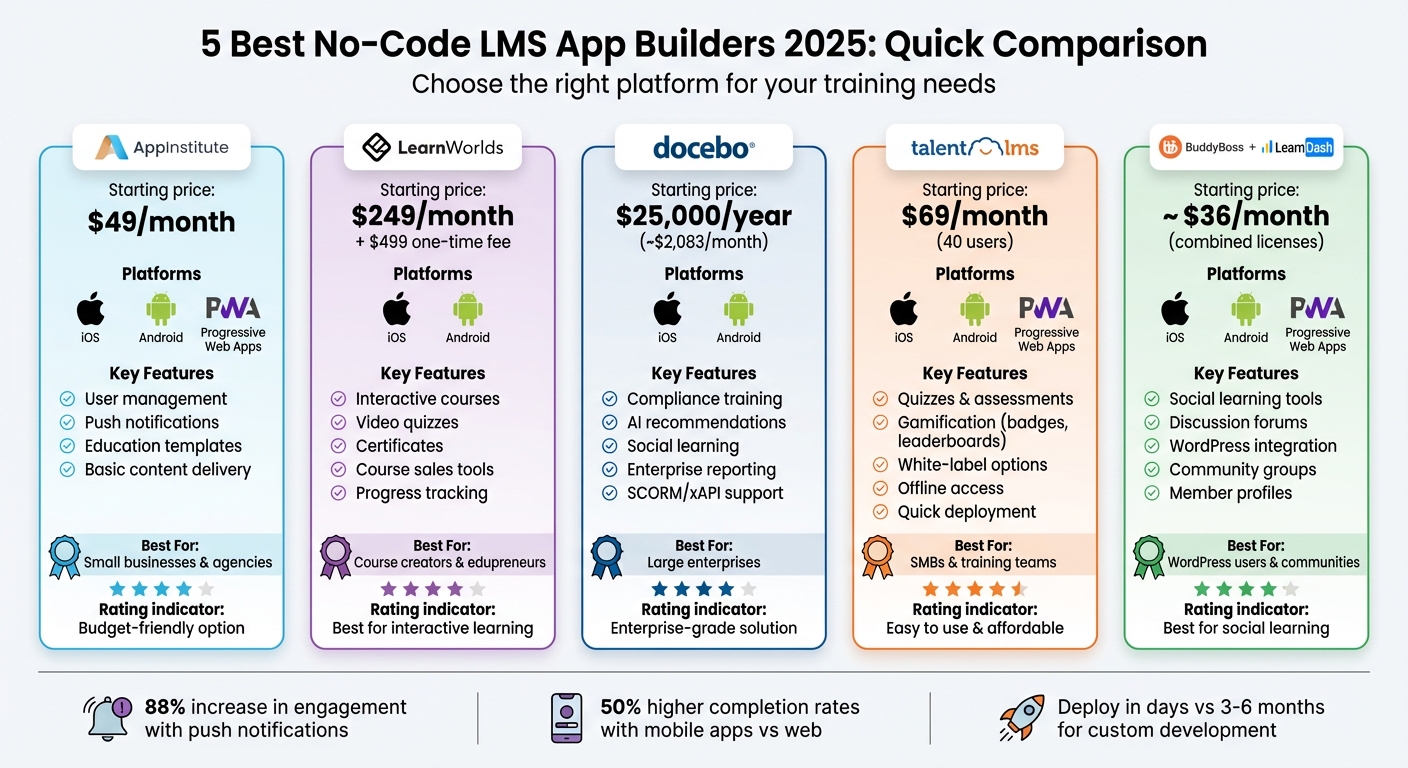
No-Code LMS App Builders Comparison: Features, Pricing & Best Use Cases 2025
Create an LMS Mobile App Without Coding in 2025

Quick Comparison
| Platform | Starting Price (USD) | Key Features | Best For |
|---|---|---|---|
| AppInstitute | $49/month | User management, push notifications | Small businesses, agencies |
| LearnWorlds | $249/month + $499 fee | Interactive courses, certificates | Course creators, small businesses |
| Docebo | $25,000/year | Compliance training, AI tools | Large enterprises |
| TalentLMS | $69/month | Quizzes, gamification, white-label | SMBs, training teams |
| BuddyBoss for LearnDash | ~$36/month + app fees | Social learning, WordPress integration | WordPress users, communities |
These tools simplify app creation, reduce costs, and speed up deployment, making them a practical choice for educators, businesses, and training providers.
How No-Code LMS App Builders Work
No-code LMS app builders make creating mobile learning apps a breeze by using a drag-and-drop interface and a visual canvas. You don’t need to write a single line of code. The workspace typically shows a phone preview alongside a panel of components like text, videos, quizzes, course catalogs, buttons, and menus. You simply drag these elements onto your canvas. Customizing colors and fonts is just as easy, thanks to visual settings, and linking buttons to different screens – like course pages or enrollment flows – requires simple commands like "On tap → Go to Screen X." Many platforms even let you preview your app in real-time on both iOS and Android devices. This way, you can test the learner’s experience – from browsing courses to completing quizzes and downloading certificates – before you hit publish.
To speed things up, pre-built templates offer a ready-made framework tailored to common training needs, such as employee onboarding, compliance training, or online course marketplaces. For instance, choosing an "Employee Onboarding LMS" template gives you a pre-designed home dashboard, course catalog, progress tracker, and quiz pages. All you need to do is replace the placeholder content with your branding, courses, and policies. This process can cut your setup time from weeks down to just days. Some platforms even include templates designed for specific industries like healthcare or retail. These templates may come preloaded with features like compliance reminders and reporting fields that align with U.S. standards such as OSHA or HIPAA, making them especially useful for businesses in regulated fields.
Behind the scenes, the platform takes care of the technical heavy lifting – managing databases, hosting, and user authentication – so you can focus entirely on content and design. Core LMS features like course catalogs, lessons, quizzes, user roles, enrollment, progress tracking, and certificates are all accessible through user-friendly interfaces. For example, creating a course is as simple as clicking "Create Course", adding a title and description, uploading videos or PDFs, and organizing lessons with drag-and-drop tools. Quizzes are just as straightforward: select question types (e.g., multiple choice or true/false), set correct answers, and define passing scores – all within a visual editor.
Integrations are another key feature, allowing you to connect your app with tools like payment gateways (Stripe, PayPal), HRIS systems (Azure AD, Okta), CRMs, and collaboration platforms. Configuration wizards make setting these up quick and painless. Plus, updates are cloud-based: when you tweak course content, navigation, or add new modules in the editor, those changes appear instantly or the next time learners open the app – no need for a lengthy resubmission process.
This streamlined process means faster launches, predictable subscription costs, and easy updates. Training teams can adjust courses and layouts themselves without waiting on IT support. For educators and businesses in the U.S., you can take your existing training materials and launch a fully functional app in just days or weeks – far quicker than the three to six months it typically takes to build a custom solution.
Key Features to Look for in an LMS App Builder
To get the most out of your LMS app, focus on these must-have features.
Course management tools are essential when selecting a no-code LMS app builder. You’ll want a platform that allows you to create, organize, and update courses effortlessly. Look for tools that support modules, lessons, quizzes, and certificates. The best options include drag-and-drop editors, enabling you to upload videos or PDFs, arrange lessons, and set up assessments – all without needing to code. This makes it easy for subject matter experts to keep content fresh and relevant.
User management is another critical feature. Choose a platform that comes with pre-designed roles like admin, instructor, student, and manager. These roles should have customizable access controls, and assigning them should be as simple as selecting from a dropdown menu – no coding required.
Don’t overlook mobile content delivery, especially if your learners are on-the-go, such as field teams or frontline workers. Your LMS app builder should support native iOS and Android apps as well as Progressive Web Apps (PWAs). Features like offline access and mobile-friendly templates ensure training is accessible anytime, anywhere.
To keep learners engaged, push notifications are a game-changer. These alerts can notify users about new courses, deadlines, or completed certifications. In fact, push notifications can increase engagement rates by up to 88%. Platforms like AppInstitute make setting up notifications simple with one-click configurations and workflows that trigger alerts automatically.
For a professional look, branding and white-labeling features are indispensable. These tools allow you to customize your app’s logo, colors, fonts, and even its app store listing to align with your organization’s identity. Drag-and-drop editors make this process straightforward, so your app feels uniquely yours.
To measure success, analytics tools are key. They let you track course completions, time spent on training, quiz results, and overall engagement. Visual dashboards make it easy to understand learner progress and evaluate ROI.
Lastly, prioritize security features to protect learner data. Look for built-in options like single sign-on (SSO), data encryption, role-based access control, and compliance with standards such as GDPR, HIPAA, or SOC 2. Most no-code platforms manage these technical aspects automatically, ensuring enterprise-level security without requiring a dedicated IT team.
1. AppInstitute

AppInstitute is a no-code platform designed for creating professional mobile apps, making it a handy tool for educators and businesses aiming to build learning apps. While it’s not exclusively focused on LMS development, its School & Education template is tailored for delivering educational content and staying connected with students through custom mobile apps. Let’s take a closer look at its LMS-related features.
LMS Features and Course Management Capabilities
AppInstitute provides tools for managing user enrollments and profiles, along with push notifications to keep students informed about updates, deadlines, and new materials. Its industry-specific templates simplify the process of organizing and delivering educational content. However, the platform does not include built-in LMS features like quizzes or progress tracking. To achieve full course management, you’ll need to integrate external tools.
Supported Platforms (iOS, Android, PWA)
Your learning app can be deployed across iOS, Android, and as a Progressive Web App (PWA). Native iOS and Android apps are available through the App Store and Google Play, while PWAs are accessible via web links and can be saved directly to a device’s home screen. One limitation to note: native apps don’t support offline access, which could be a challenge for users in areas with limited connectivity.
Branding and Customization Options
AppInstitute’s drag-and-drop editor makes it easy to customize your app. You can adjust logos, colors, and layouts to reflect your organization’s branding, with real-time previews to see changes as you make them. For more advanced branding needs, the ‘Hire A Pro’ service offers expert assistance to ensure your app matches your educational identity perfectly.
Pricing and Target Users
AppInstitute’s pricing starts at $49/month (billed annually) for a Progressive Web App that includes push notifications and user management. For $99/month, you can add deployment to the App Store and Google Play, while the $149/month plan includes tablet support and a dedicated account manager. This pricing structure is ideal for educators, small businesses, and agencies building LMS apps. Additionally, a reseller program is available for agencies looking to expand their offerings.
2. LearnWorlds Mobile App Builder

Let’s dive into how LearnWorlds approaches mobile learning with its Mobile App Builder.
The LearnWorlds Mobile App Builder transforms online course material into a fully branded mobile app. Designed with a mobile-first approach, it’s tailored for educators, course creators, and training providers who want to offer their learners a seamless experience on the go.
Details about its specific LMS features, compatibility with mobile platforms, customization capabilities, and pricing aren’t extensively covered here. For a deeper understanding, it’s best to check the official LearnWorlds resources.
This quick snapshot offers a glimpse into what LearnWorlds brings to the table, complementing our broader look at other top platforms.
sbb-itb-539ae66
3. Docebo Mobile App Publisher

Docebo takes its enterprise LMS capabilities a step further with the Docebo Mobile App Publisher, a tool designed for organizations already using their platform. If your company relies on Docebo Learn or is considering adopting it, this add-on allows you to transform your LMS into a branded native mobile app for iOS and Android devices.
This tool essentially acts as a white-label solution, wrapping Docebo’s robust LMS features into a mobile app that reflects your brand. Learners gain access to SCORM and xAPI-compliant courses, videos, quizzes, learning paths, and social learning tools – all integrated seamlessly with the main LMS. Updates made by admins sync instantly with the app. Plus, courses delivered through branded mobile apps reportedly achieve 50% higher completion rates compared to their web-based counterparts.
Supported Platforms and Publishing Process
Docebo generates native mobile apps for iOS and Android, avoiding the limitations of progressive web apps. The process is entirely no-code, letting you configure branding elements – like logos, colors, and layouts – directly in Docebo’s admin panel. Once configured, the system creates app binaries (.ipa for iOS and .apk/.aab for Android), ready for submission to the Apple App Store and Google Play. You’ll need your own Apple and Google developer accounts to publish the apps, and while these accounts come with standard developer fees, Docebo provides detailed submission guidelines to simplify the process.
Branding and Customization Options
The platform offers extensive customization, allowing you to tailor the app name, splash screen, colors, typography, and home screen layout to match your corporate identity. Many U.S.-based enterprises use this feature to create region-specific or business-unit-specific apps, all managed through a single Docebo backend. This flexibility is especially helpful for companies with large, distributed teams. Additionally, the platform supports multiple languages, making it ideal for global organizations or those with Spanish-speaking employees.
Pricing and Target Users
Docebo charges a one-time fee starting at $1,500 for publishing the app (covering both iOS and Android builds), in addition to an annual LMS subscription starting at around $25,000/year for enterprise clients. Mid-sized companies can request custom pricing. Premium support and updates can add an extra $5,000–$10,000 annually. This pricing structure primarily appeals to mid-to-large enterprises in industries like retail, hospitality, logistics, manufacturing, and sales enablement – sectors where mobile-first training is critical for deskless workers.
On G2, Docebo holds an impressive 4.7/5 rating from over 1,200 reviews, with users praising the smooth transition from LMS to mobile app. However, some reviewers note the high upfront cost and the steep learning curve for advanced customizations.
4. TalentLMS Mobile and White-Label Options

TalentLMS offers native apps for iOS and Android, allowing businesses to roll out mobile learning programs in just days – no coding required. With over 70,000 teams worldwide relying on the platform, it’s become a go-to solution for SMBs, training companies, and mid-sized teams that need mobile learning tools up and running quickly. Its ease of use and speed make it a perfect fit for fast-moving organizations.
LMS Features and Course Management Capabilities
The platform provides a straightforward interface for managing training programs. You can create courses packed with videos, quizzes, and assignments, while also automating grading, tracking learner progress, and issuing certifications. These features sync seamlessly across both web and mobile. For those looking for advanced options, TalentLMS includes tools like branching scenarios, drip content scheduling, and gamification elements such as badges and leaderboards.
Learners can even download course materials for offline use and complete quizzes without an internet connection. Once they reconnect, their progress syncs automatically. Companies like UPS and Samsung have leveraged these advanced capabilities to achieve impressive results. For example, UPS uses the mobile app to deliver over 1 million driver certification trainings annually, while Samsung trains its global partners through white-labeled apps that feature quizzes and certifications, boasting a 90% course completion rate.
Supported Platforms and White-Label Options
TalentLMS supports flexible deployment to meet diverse needs. Every subscription includes a standard mobile app for iOS and Android, where learners can access courses, discussions, and tests through the TalentLMS-branded interface. For organizations seeking complete control over branding, the TalentLMS+ white-label option is available. This allows businesses to customize the app’s name, icon, splash screen, and color scheme while removing all TalentLMS branding. This option is especially useful for training providers and franchises that need a fully branded experience. While you’ll need Apple and Google developer accounts to publish the app, TalentLMS takes care of the technical setup and ongoing support.
Pricing and Target Users
TalentLMS pricing starts at $69 per month for 40 users, $149 per month for 150 users, and $459 per month for 1,000+ users. Enterprise plans are also available with custom terms. All prices are in USD, and there are no setup fees. The standard mobile app is included at all pricing tiers, but the white-label publishing option requires a Premium plan or higher. This pricing structure is tailored for SMBs looking for quick deployment, training companies offering branded apps to clients, and mid-sized organizations with mobile-first workforces, particularly in industries like retail, hospitality, and field services.
5. BuddyBoss for LearnDash

BuddyBoss works seamlessly with LearnDash, a leading WordPress LMS platform, to create a community-driven learning experience on both web and mobile. This pairing is perfect for course creators and training businesses already using WordPress who want to integrate social features like discussion forums, activity feeds, and member profiles into their courses. The BuddyBoss App extends this functionality by building native iOS and Android apps that pull content directly from your WordPress site, offering learners a fully branded mobile experience – no coding required. Together, they simplify course delivery while boosting learner engagement.
LMS Features and Course Management Capabilities
LearnDash covers the essential LMS features: courses, lessons, quizzes, assignments, progress tracking, certificates, and drip-fed content. It also allows you to set prerequisites and design learning paths. BuddyBoss enhances this foundation by adding social learning tools like groups, activity feeds, private messaging, gamification (badges and points), and member profiles. For example, a certification provider could deliver multi-module courses with timed quizzes and certificates using LearnDash while leveraging BuddyBoss to manage cohorts and send reminders. Similarly, a fitness entrepreneur could launch a "30-Day Challenge" app, where LearnDash delivers daily lessons and BuddyBoss fosters community engagement through check-ins and progress updates.
Supported Platforms and Branding Options
The BuddyBoss App enables you to create native mobile apps for iOS and Android, which you can publish under your own brand in the Apple App Store and Google Play. To do this, you’ll need developer accounts ($99/year for Apple and a one-time $25 fee for Google). BuddyBoss handles the technical aspects of building and maintaining the app. Both the web and mobile platforms allow you to fully customize the branding – logos, color schemes, typography, app icons, splash screens, and navigation structure. The result is a completely white-labeled experience with no BuddyBoss branding. You also have control over which LearnDash courses and BuddyBoss community features appear in the app, ensuring a clean and on-brand mobile interface.
Pricing and Target Users
BuddyBoss pricing includes two components: the web platform (typically a few hundred dollars per year for the BuddyBoss Theme/Platform Pro) and the BuddyBoss App (an annual SaaS subscription, usually in the low-to-mid four-figure range). Additionally, a LearnDash license is required, which is also billed annually. This setup is ideal for course creators and coaches familiar with WordPress, small to midsize training businesses looking for branded apps for their programs, professional associations managing membership-based learning communities, and internal L&D teams at mid-sized companies that prefer owning their LMS infrastructure instead of relying on a hosted SaaS solution. It’s a great choice for those who value customization, data control, and a community-centered learning environment.
Platform Comparison Table
Here’s a quick look at five no-code LMS app builders tailored for U.S. educators and training businesses. The table outlines essential LMS features, mobile platform compatibility, branding options, engagement tools, and pricing in USD – making it easier to find the right fit for your needs and budget.
| Platform | Core LMS Features | Supported Platforms | Branding Options | Engagement Tools | Pricing (USD) | Best For |
|---|---|---|---|---|---|---|
| AppInstitute | User management, content pages, media hosting, education templates | iOS, Android, PWA | Custom logo, colors, domain; full branding control; reseller options | Push notifications, user management, in-app content | From $49/mo (Instant) to $149/mo (App Stores Premium), billed annually | Small businesses, local training providers, agencies creating branded training apps |
| LearnWorlds Mobile App Builder | Courses, lessons, interactive video, quizzes, certificates, progress tracking, course sales | Native iOS, Android | Enterprise-level white-label options; custom branding, app icons, splash screens | Push notifications, in-app purchases, interactive video, learner analytics | From $249/mo (Starter Sites) + $499 one-time app fee, billed annually | Solo creators, edupreneurs, small-to-mid-sized training businesses selling courses |
| Docebo Mobile App Publisher | Compliance training, AI recommendations, social learning, detailed reporting, certifications | Native iOS, Android | Branded mobile apps; enterprise-grade white-label options | Push notifications, gamification, AI coaching, social learning | Custom enterprise pricing, typically starts around $25,000/year (~$2,083/mo) | Mid-sized and large enterprises focused on compliance and employee training |
| TalentLMS Mobile & White-Label | Courses, quizzes, certificates, branching scenarios, gamification, basic reporting | iOS, Android, PWA | White-label mobile apps with custom branding on paid plans | Push notifications, gamification (badges, points, leaderboards), microlearning | From $69/mo (Starter, 40 users) to $459/mo (Premium, 1,000 users), billed annually | Small businesses and training teams looking for a straightforward, budget-friendly LMS with mobile access |
| BuddyBoss for LearnDash | Courses, lessons, quizzes, assignments, certificates, drip content, progress tracking (via LearnDash); community groups, activity feeds, messaging (via BuddyBoss) | iOS, Android, PWA (via BuddyBoss App) | Full customization through WordPress themes; white-labeled apps with no BuddyBoss branding | Push notifications, discussion forums, private messaging, gamification (badges, points), social feeds | BuddyBoss Platform Pro $228/yr + LearnDash $199/yr (~$36/mo combined), plus hosting and optional app fees | Membership-site owners and communities prioritizing social learning |
Important notes for U.S. users: All pricing is in USD with annual billing. Additionally, Apple’s developer account costs $99 per year, and Google Play charges a one-time $25 fee. AppInstitute offers direct control over branding and app-store listings, while TalentLMS provides an easy-to-use, no-code solution for quick mobile app deployment.
This table captures the core features, mobile capabilities, and pricing of each platform, providing a clear picture of what each offers to help you make a confident choice.
Conclusion
No-code LMS builders are reshaping how mobile training is delivered. Instead of dealing with hefty costs and long development timelines, these tools allow you to launch a branded iOS, Android, or PWA learning app in just days or weeks, thanks to pre-built templates.
By removing the need for in-house developers, these platforms give educators and creators the freedom to update courses, tweak content, and send push notifications on their own. This level of flexibility is especially valuable in industries where compliance or product training needs frequent updates.
When choosing a platform, it’s essential to align it with your goals. Whether you’re a small business, an enterprise, or an individual creator, there’s a tool for you:
- AppInstitute: Perfect for small businesses looking for a general-purpose solution, starting at $49 per month.
- LearnWorlds: Ideal for delivering interactive courses.
- Docebo: Tailored for enterprise compliance needs.
- TalentLMS: Great for quick and budget-conscious deployment.
- BuddyBoss: Best for building community-focused learning experiences.
Beyond pricing, focus on features that matter most to your needs – like offline access, push notifications, assessments, ease of use for admins, and integration options to ensure smooth implementation.
Start by clearly defining your goals, whether it’s selling courses, training employees, or fostering a learning community. Then, set a budget that fits your needs: solo creators often spend less than $150 per month, small-to-medium businesses typically fall in the $150–$500 range, and enterprises usually require custom plans. Before fully committing, take advantage of free trials or sandbox environments to test features like content uploads, learner experience, notifications, and reporting with a small group. This approach ensures a smoother rollout when you’re ready to go live.
FAQs
What are the key advantages of using no-code LMS app builders?
No-code LMS app builders make creating apps simple and accessible, even for those without any coding experience. They come with pre-designed templates and an easy-to-use drag-and-drop interface, allowing you to craft professional, customized apps that suit your specific requirements.
One standout feature is the real-time preview, which lets you instantly see how your changes look, streamlining the design process. Once your app is ready, it can be quickly launched on app stores or as Progressive Web Apps (PWAs). These platforms are also a budget-friendly solution, saving both time and money while offering the flexibility to make updates as needed.
How do no-code LMS platforms protect user data and stay compliant with regulations?
No-code LMS platforms take data protection seriously, employing strong security measures to keep user information safe and meet regulatory requirements. These measures often include encryption to shield sensitive data, secure user authentication to block unauthorized access, and regular security audits to find and fix potential weaknesses.
On top of that, these platforms comply with key regulations like GDPR and CCPA. They also implement access controls, ensuring that only authorized users can view specific data. These steps not only help meet legal standards but also build user confidence in the platform’s commitment to safeguarding information.
Can I connect third-party tools to a no-code LMS app builder?
Yes, many no-code LMS app builders, such as AppInstitute, let you connect third-party tools to expand your app’s capabilities. These integrations can bring in features like analytics, payment processing, or communication tools to make your app more functional.
Platforms like AppInstitute make it simple to link external tools, helping you simplify workflows and deliver a smoother experience for your users.
Related Blog Posts
- How to Build an App Without Coding Skills
- 7 Best No-Code App Builders for Small Business
- App Development Cost: DIY vs Hiring Professionals
- Top 7 No-Code Trends for Cross-Platform Apps 2025
Last Updated on September 25, 2026 by Becky Halls
0 thoughts on “5 Best No-Code LMS App Builders 2025”