
No-code platforms let you create apps without coding, saving time and money compared to traditional app development, which can cost $40,000 to $400,000. These platforms use subscription tiers, usage-based pricing, or freemium models. Costs can range from $300 to $1,000 annually, but hidden fees like app store charges ($99/year for Apple, $25 one-time for Google) and payment processing fees (2.9% + $0.30 per transaction) add up. For example, AppInstitute offers plans starting at $49/month, with higher tiers for native apps and premium features like tablet support and account managers. To avoid surprises, define your needs, calculate total costs (including third-party tools), and plan for growth.
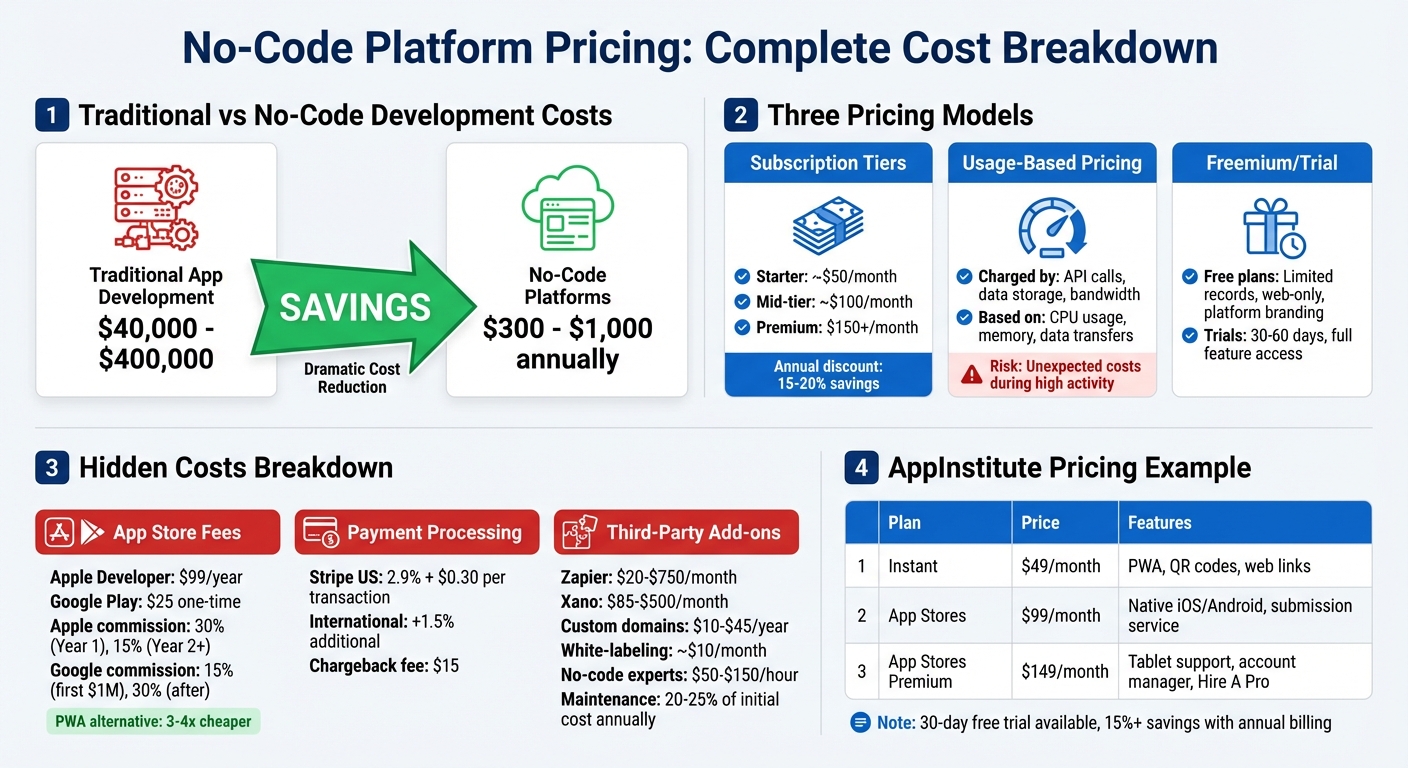
No-Code Platform Pricing Models and Cost Breakdown Comparison
The Big Shift in No-Code Pricing (Here’s Why You’ll Love It)

Types of Pricing Models
No-code platforms typically follow a few key pricing structures. The most common ones include subscription tiers, usage-based pricing, and freemium or trial options. Here’s a breakdown of how these models work.
Subscription Tiers
A popular approach among no-code platforms is offering fixed monthly or annual subscription plans. These are often divided into tiers – like Starter, Professional, and Enterprise – with each level providing additional features and higher usage limits. For instance:
- Starter plans might begin at around $50 per month.
- Mid-tier plans are usually priced near $100 per month.
- Premium options can cost $150 or more.
The differences between these tiers often include factors like whether you can publish native apps (e.g., web-only vs. iOS and Android), the number of editor seats available, database storage capacity, and the type of customer support provided. Additionally, opting for annual billing generally brings a discount of 15% to 20% compared to monthly payments.
Usage-Based and Resource-Based Pricing
Some platforms charge based on how much you actually use their services. This might include metrics like API calls, data storage, or bandwidth. Others calculate fees based on infrastructure consumption, such as CPU usage, memory, or data transfers. While this model can be flexible, it also introduces the risk of unexpected costs during periods of high user activity. Keeping a close eye on usage and setting up billing alerts can help you avoid surprises.
Freemium and Trial Options
Freemium plans and time-limited trials are designed to let users test the waters before making a financial commitment. Free plans often come with limitations, such as fewer database records, restricted publishing options (e.g., web apps only), or mandatory platform branding. Trial periods, which typically last 30 to 60 days, usually unlock full access to premium features. This gives you the chance to build a working prototype, test integrations, and gather feedback to refine your app idea before deciding on a paid plan.
Hidden Costs and Extra Fees
The price you see on a subscription plan often doesn’t reflect the entire cost. Many hidden fees can sneak in, making the total expense significantly higher. Let’s break down some of the most common extra charges.
App Store and Distribution Fees
Publishing a native app comes with additional costs that aren’t covered by your no-code platform subscription. For instance, Apple requires a $99 annual fee to join its Developer Program, while Google Play charges a one-time $25 registration fee. Beyond these upfront fees, both platforms take a cut from your app’s digital sales. Apple charges a 30% commission on in-app purchases during the first year, which drops to 15% for subscriptions after that. Google Play, on the other hand, takes 15% of the first $1 million in annual revenue, then raises the rate to 30% for any revenue exceeding that amount. These fees apply only to digital goods like subscriptions or virtual tokens, while physical goods remain exempt. If you’re using a progressive web app (PWA) instead, you can bypass these fees entirely, and PWAs are generally 3–4 times cheaper to develop and maintain.
And that’s not all – payment processors introduce their own layer of fees.
Payment Processing Fees
If your app processes payments, you’ll likely rely on a service like Stripe. In the U.S., Stripe charges 2.9% plus $0.30 per successful card transaction. If you’re dealing with international cards, an additional 1.5% fee applies. There’s also a $15 chargeback fee for any disputed transactions. These fees can add up quickly, especially if your app handles a high volume of transactions.
Third-Party Services and Add-Ons
Extra functionality often means turning to third-party tools. Many no-code platforms require add-ons like automation tools (Zapier: $20–$750/month), backend services (Xano: $85–$500/month), or custom domains ($10–$45/year). You might also need advanced analytics, email marketing tools, or white-labeling services, which typically cost around $10/month to remove branding.
Maintenance costs are another factor. Regular updates and upkeep can add 20–25% of your initial investment each year. If you hire no-code experts for assistance, expect to pay $50–$150 per hour. Additionally, many platforms impose extra fees if you exceed limits on database records, file storage, or API calls. These overage fees can catch you off guard if you’re not monitoring your usage closely.
sbb-itb-539ae66
How to Compare Platform Costs
Hidden fees can sneak up on you, so it’s important to take a structured approach when evaluating platform costs. Here’s how to break it down and avoid surprises.
Define Your Business Needs
Start by outlining your app’s technical needs. What core features do you require? For example, features like food ordering or loyalty programs often determine which pricing tier you’ll need to choose. Next, decide how you’ll distribute your app. A Progressive Web App (PWA) is a more budget-friendly option, launching instantly via web links. On the other hand, native apps for the Apple App Store and Google Play Store typically come with higher-tier subscriptions, plus additional charges like Apple’s $99/year developer fee and Google’s $25 one-time fee.
Think about your data requirements. How much storage and how many database records will you need? For reference, some platforms limit free plans to just 200 records, while paid plans might offer anywhere from 5GB to 25GB or more of storage. Also, estimate your app’s monthly activity, such as user interactions (button clicks, form submissions) or system usage (processing power). Many platforms now charge based on usage, so this is crucial for budgeting. If you plan to integrate third-party tools like Stripe for payments or Zapier for automation, list those too, as they often require higher-tier plans or come with separate fees.
Once you’ve outlined your needs, translate them into a detailed cost projection.
Calculate Total Costs
To get a clear picture of expenses, focus on annual costs rather than just monthly fees. Create a 12-month cost projection that includes your base subscription, developer account fees, payment processing charges (typically 2.9% + $0.30 per transaction in the U.S.), and any third-party integration costs.
Don’t forget to include every type of expense: one-time fees, recurring charges, and costs for integrations. If you plan to hire no-code experts for setup or customization, factor in an additional $500–$5,000 per integration, or account for 20–100+ hours of work at rates ranging from $50–$150 per hour.
Plan for Growth and ROI
Once you’ve calculated your current costs, think ahead. How will these expenses grow as your app scales? Project your costs over 12–24 months, factoring in user growth and increased data usage. Be aware of potential “scaling surprises”, where costs might rise 30–50% over five years due to price hikes, hidden fees, or the need to upgrade to enterprise-level plans. For example, some platforms may cap starter plans at 10,000 monthly app actions, while higher tiers allow for up to 500,000 actions.
Many organizations find that they recoup their no-code platform investment within a year, making the return on investment (ROI) calculation relatively simple. However, don’t overlook indirect costs like the time spent learning the platform, which can add to your overall investment.
AppInstitute‘s Pricing Structure
AppInstitute provides three pricing tiers to cater to different app distribution needs. Each plan includes unlimited push notifications and access to a user-friendly drag-and-drop editor. The main distinction lies in how your app is delivered to users.
Plan Options and Features
The Instant plan costs $49/month and focuses on Progressive Web Apps (PWAs). With this plan, your app is accessible via QR codes or web links and works on any mobile browser. You can also connect your own domain and manage users effortlessly.
The App Stores plan, priced at $99/month, adds the ability to publish native apps on the Apple App Store and Google Play Store. This plan includes AppInstitute’s submission service, which takes care of app reviews for both platforms and allows unlimited resubmissions.
For $149/month, the App Stores Premium plan offers everything in the App Stores plan, plus three additional benefits: support for iPad and Android tablets, a dedicated account manager, and professional services. Choosing annual billing for any of these plans can save you over 15% compared to monthly payments.
| Plan | Monthly Price | Key Features |
|---|---|---|
| Instant | $49 | PWA only, QR code/web link access |
| App Stores | $99 | Native iOS & Android apps, submission service |
| App Stores Premium | $149 | Tablet support, dedicated account manager, free Hire A Pro service |
Now, let’s explore how to pick the plan that best suits your needs.
Choosing the Right Plan
Your app distribution strategy plays a big role in selecting the right plan. For businesses relying on social media, email, or in-person interactions to reach users, the Instant plan is a straightforward and cost-effective choice.
If you need the visibility and trust that come with being listed on official app marketplaces, the App Stores plan is a better fit. Keep in mind, you’ll need to budget an additional $124 for developer accounts (Apple: $99/year; Google: $25 one-time).
The Premium plan is ideal if your audience frequently uses tablets or if you want a hands-off experience. This plan includes the “Hire A Pro” service, which typically costs $499 as an add-on. At $149/month, it’s a great option for those looking for professional assistance without extra fees.
AppInstitute also offers a 30-day free trial. This lets you build and test your app, experiment with push notifications, and gather feedback before committing to a subscription.
Professional Services and Support
For those needing extra help, the “Hire A Pro” service connects you with AppInstitute experts who can design your app using the platform’s no-code tools. This service is included at no additional cost with the Premium plan or can be purchased separately for lower-tier plans. It’s a great way to ensure your app has a polished, professional look while saving you time during development.
Additionally, the Premium plan includes a dedicated account manager. This personalized support can be invaluable if you’re managing advanced features like loyalty programs or food ordering systems, ensuring a smoother app-building experience.
Conclusion
Understanding no-code pricing is key to avoiding budget surprises. While traditional mobile app development can cost anywhere from $40,000 to $400,000, no-code platforms offer a much more affordable alternative, typically ranging from $300 to $1,000 per year. However, it’s crucial to know exactly what your subscription includes and be aware of any additional fees.
This shift in pricing has completely changed the game for small businesses. By offering predictable monthly subscriptions, no-code platforms have made app development an option for businesses that couldn’t previously afford the hefty price tags of traditional methods. It’s a move that has truly opened the doors for small businesses to create their own apps.
Take AppInstitute, for example. They eliminate many of the hidden costs that often come with app development. Their pricing is straightforward, starting at $49 per month for the basic Instant plan, which includes must-have features like unlimited push notifications and user management. Higher-tier plans add perks like App Store submission services. Plus, with a 30-day free trial, you can build and test your app before making a commitment. Transparent pricing like this makes it easier to plan and stay on track financially.
FAQs
Are there any hidden costs associated with no-code platforms?
Yes, no-code platforms can come with some unexpected costs. These might include usage-based fees if you go over limits for API calls, storage, or bandwidth. You could also face per-user or per-app licensing charges, which can add up as your team or app usage grows. Other costs might stem from training and onboarding, premium support packages, or bringing in experts for custom integrations. Additionally, fees for things like app store submissions or unlocking advanced features not covered in standard plans can also crop up.
To steer clear of surprises, take the time to thoroughly review the pricing details and terms. This will help you understand exactly what your subscription covers and what could lead to extra charges.
How do I choose the best pricing plan for my app development needs?
To find the right pricing plan for your needs, start by pinpointing the features your app will require. If you’re building a simple web app with push notifications, the Instant plan might be all you need. Planning to publish on the Apple App Store or Google Play Store? The App Stores plan covers submission and resubmission support. For more advanced requirements, like tablet compatibility or priority support, the App Stores Premium plan is ideal. Agencies or businesses managing multiple apps should check out reseller options for bulk pricing.
Keep your budget in mind. Monthly pricing starts at $49 for Instant, $99 for App Stores, and $149 for App Stores Premium. Opting for annual billing can save you over 15%, lowering your overall expenses. If you anticipate your app expanding or needing more features, it’s often smarter to choose a higher tier upfront. This way, you’ll avoid potential upgrades later and ensure you’re fully equipped from the start.
What should I consider when planning the long-term costs of a no-code platform?
When thinking about the long-term expenses of a no-code platform, it’s crucial to look beyond the subscription price and calculate the total cost of ownership (TCO). Start by determining the pricing model that aligns with your needs. This could be monthly or annual subscriptions, usage-based pricing (like charges for API calls or storage), or per-user or per-app fees, which may rise as your team expands or you create more apps.
Take into account both direct costs, such as license fees, overage charges, and storage, as well as indirect costs, like onboarding, training, and ongoing app maintenance. Don’t forget about potential hidden expenses, including premium templates, custom features, or fees for developing apps for clients. Also, check if the platform’s pricing structure can scale with your business without unexpected cost spikes.
For instance, AppInstitute provides tiered plans starting at $49/month, which include features like unlimited push notifications and PWA support. Higher tiers offer extras like App Store submission and advanced services. Choosing an annual plan can save you over 15%, making it a practical option for long-term planning. By considering all these factors, you can ensure the platform remains a budget-friendly solution as your business grows.
Related Blog Posts
- How to Build an App Without Coding Skills
- How Subscription Apps Generate Recurring Revenue
- Cost Breakdown: Building Apps with No-Code Tools
- 5 Common No-Code App Issues Solved
Last Updated on December 31, 2025 by Becky Halls
0 thoughts on “How No-Code Platform Pricing Works”