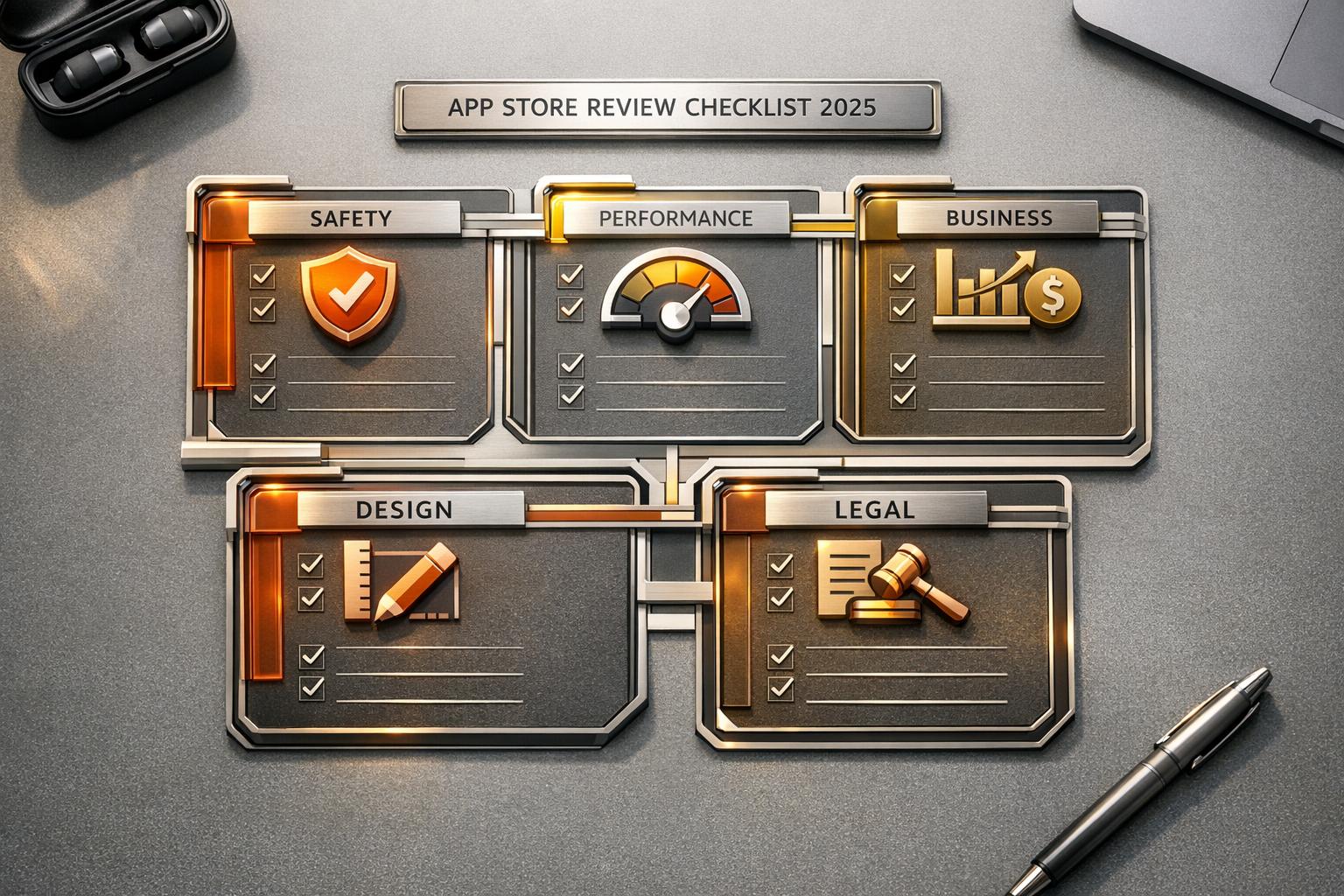
Getting your app approved by Apple can be challenging. Nearly 40% of iOS app submissions face delays or rejection due to preventable errors. Apple’s review process focuses on five key areas: Safety, Performance, Business, Design, and Legal. Meeting these criteria ensures faster approval and avoids costly delays.
We’ve learned that most approval delays aren’t caused by major issues but instead come from small, easily avoidable oversights. A clean, well-documented submission saves days, sometimes weeks, in the review cycle.
Here’s what you need to know:
- Safety: Apps with user-generated content must include moderation tools like “Report” and “Block” buttons. Age-appropriate content is critical, with stricter rules for regions like Australia and the EU.
- Performance: Test your app on real devices, replace placeholder content, and ensure metadata matches the app experience. Apple rejects 25% of submissions due to performance issues.
- Business: Follow Apple’s rules for in-app purchases, pricing transparency, and include a “Restore Purchases” button for subscriptions.
- Design: Apps must provide a native iOS experience, not just a web wrapper. Use features like Push Notifications or HealthKit to stand out.
- Legal: Privacy policies must clearly disclose data usage, and apps must offer account deletion options. New rules for AI transparency and age ratings apply in 2025.
Our Tip: Provide demo credentials, ensure backend services are live, and double-check your app against the updated guidelines. Apple reviews 90% of submissions in under 24 hours – attention to detail can save you from rejection.
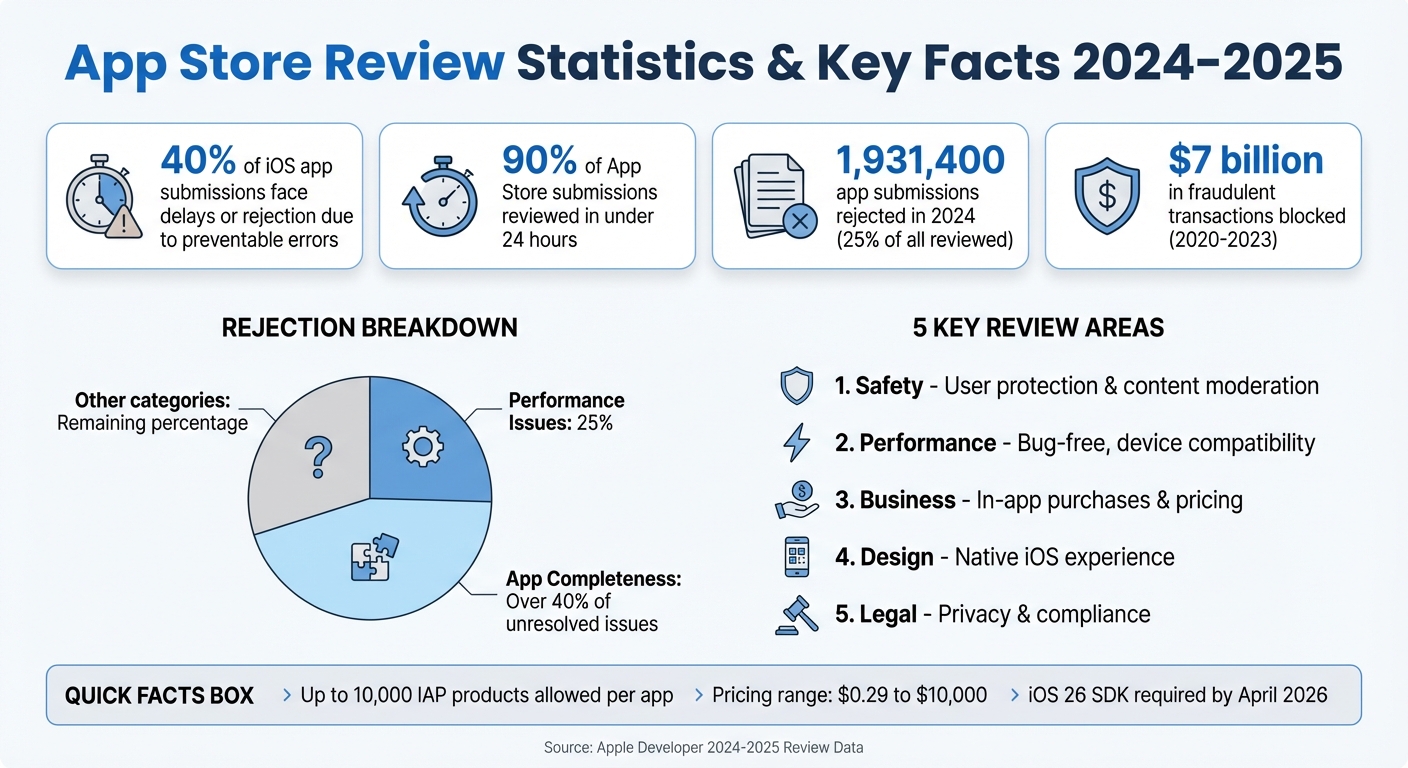
App Store Review Statistics and Rejection Rates 2024-2025
Complete App Store Review Submission Checklist in 8 Minutes
sbb-itb-539ae66
1. Safety Requirements
Apple’s safety guidelines are designed to prioritize user protection. If your app features user-generated content (UGC) or social networking elements, you must implement specific safeguards before submitting it. Skipping these steps could result in your app being rejected. These precautions serve as the foundation for meeting Apple’s broader requirements.
1.1 Content Moderation
For apps that include UGC, you need to take several steps to ensure a safe environment. This includes filtering out inappropriate material, providing users with tools to report offensive content, blocking abusive accounts, and offering clear support contact information. To meet these criteria, make sure every piece of content has a “Report” button and every user profile includes a “Block” option. Include demo credentials in your App Review Notes, set up automated keyword filters, and apply rate limits for new accounts. Apps that focus on explicit content, Chatroulette-style interactions, or allow bullying are at high risk of being removed. For web-based services, any NSFW (Not Safe for Work) content must be hidden behind an opt-in mechanism.
1.2 Age-Appropriate Content
According to Guideline 1.2.1(a), apps must clearly flag content that exceeds the app’s age rating and enforce age restrictions based on either verified or declared age. In late 2025, Apple introduced the Declared Age Range API to assist developers in meeting these requirements, particularly in regions like Texas, Utah, and Louisiana. Additionally, starting December 10, 2025, social media platforms in Australia must prevent anyone under 16 from creating accounts. Developers will also need to deactivate any existing accounts belonging to underage users. If your app includes AI assistants or chatbots, you should evaluate how often they generate sensitive content and adjust the app’s age rating accordingly.
2. Performance Requirements
Your app needs to perform seamlessly on every supported device. Kaushik Rajan, an Engineer and Computer Scientist, emphasizes this point: “The single largest category for rejection is ‘Performance.’ This highlights a critical truth: your app must be technically sound before you even consider submitting.” In 2024 alone, Apple turned away 1,931,400 app submissions – around 25% of all reviewed. Over 40% of unresolved issues stemmed from App Completeness problems, including crashes and placeholder content. Carefully review the following requirements to steer clear of common performance pitfalls.
“Every time we’ve had an app rejected, the problem was something Apple flagged in their guidelines months earlier. Staying ahead of policy updates is the closest thing to a ‘shortcut’ in App Store approval.” AppInstitute Team
2.1 Bug-Free Experience
Conduct a thorough Reviewer Run to test all major app functions. Replace any placeholders like “Lorem Ipsum”, “Dummy”, or “Coming Soon” with finalized content. Even small oversights, such as a missing privacy policy link or a non-functional restore purchases option, can lead to repeated rejections. If your app requires user login, provide a working demo account (including username and password) in the App Review Notes.
2.2 Device Compatibility
Testing your app on actual devices – not just simulators – is essential. Simulators can miss issues that only show up in real-world scenarios, such as broken flows or timeouts under different network conditions. Lucija Knezic, Senior CSM & Product Strategy Manager at AppFollow, explains: “Apple reviewers are humans under pressure… If they can’t figure out your app in the first two minutes, they’ll just flag it.” Ensure your backend is live and stable during the review process. If your app uses IP restrictions, whitelist Apple’s IP range to avoid it appearing broken. Be aware that starting in April 2026, all submissions must use the iOS 26 SDK or later.
2.3 Accurate Metadata
Your App Store metadata must align perfectly with your app’s actual experience. For instance, in August 2025, a launch was delayed because of a price mismatch – $4.99 in the metadata versus $5.99 in-app. Screenshots should showcase your app in action, not just splash screens or title art. Use the “Notes for Review” section in App Store Connect to clarify features that might not be immediately obvious or that require specific hardware. Nearly 40% of iOS app submissions face delays or rejections due to simple, preventable errors like these.
3. Business Requirements
Apple has put in place strict rules for monetization to ensure user protection and maintain trust. Interestingly, over 40% of unresolved review issues are tied to App Completeness, which includes problems like non-functional in-app purchases. From 2020 to 2023, Apple successfully blocked over $7 billion in potentially fraudulent transactions. Setting up your business model correctly from the start can save you from repeated rejections and user dissatisfaction.
3.1 In-App Purchases
If your app offers digital goods or subscriptions, you must use Apple’s StoreKit In-App Purchase system. This applies to everything from in-game currency and premium features to streaming content and auto-renewable subscriptions. Linking to external payment systems or bypassing Apple’s payment process is strictly prohibited.
When submitting your first in-app purchase (IAP), it must be included with a new app version. Afterward, you can add additional IAPs independently. Apple allows developers to create up to 10,000 in-app purchase products per app, with pricing options ranging from $0.29 to $10,000. For apps with account-based features, you should provide a demo mode or active demo accounts to test the purchase flow.
3.2 Pricing Transparency
Make sure the full billed amount is prominently displayed on the sign-up screen. For annual subscriptions, always show the total yearly price instead of just a monthly breakdown. For instance, if your annual subscription costs $59.99, this figure should be more visible than any “$4.99/month” equivalent.
Additionally, app descriptions, screenshots, and previews must clearly indicate if certain items or levels require extra purchases. Avoid including pricing information or terms like “free” in your app name, subtitle, or keywords if core functionality requires purchases. Sign-up screens must clearly outline the subscription name, duration, and a detailed description of the content or services users will receive.
3.3 Restore Purchases
If your app includes non-consumable IAPs or auto-renewable subscriptions, a Restore Purchases button is mandatory. This feature ensures users can regain access to previously purchased content when switching devices or redownloading the app. Place a clearly labeled “Restore Purchases” button in either your settings menu or on the main subscription paywall.
“Your app must also include a restore mechanism for any restorable In‑App Purchases, per App Review Guideline 3.1.1.” – Apple Developer
To implement this, use the currentEntitlements property in StoreKit to identify active entitlements and immediately grant access without requiring a new transaction. Be sure to thoroughly test this functionality in the Apple sandbox environment before submitting your app.
Once your business requirements are squared away, you can shift your attention to creating a design that elevates the user experience.
4. Design Requirements
Once your business model is in place, it’s time to focus on creating a native design that enhances user interaction. Apple expects apps to provide a distinct experience that goes beyond what a mobile website can offer. Did you know that about 90% of App Store submissions are reviewed in less than 24 hours? However, design-related rejections can quickly throw off your timeline. To avoid this, your app must deliver a native experience that earns its spot on a user’s home screen.
4.1 More Than a Website
If your app is just a repackaged version of your website or a collection of links, it will likely be rejected. Apple’s Guideline 4.2 (Minimum Functionality) makes it clear: apps must include features, content, and a user interface that go beyond what a web wrapper offers. In fact, more than 40% of unresolved review issues come from incomplete app content, such as placeholder material.
“Websites served in an iOS app, web content that is not formatted for iOS, and limited web interactions do not make a quality app.” – Apple Developer
To pass Apple’s review process, your app should utilize native iOS features that a standard website can’t replicate. Consider integrating tools like Push Notifications, Apple Pay, HealthKit, or ARKit to set your app apart. Follow the Human Interface Guidelines (HIG) to ensure your app feels like a natural part of the iOS ecosystem. Features like offline functionality or cached content can also improve usability by allowing access without an internet connection.
If your app doesn’t meet these expectations, Apple may recommend delivering your content through Safari instead. As the Apple Review Team puts it:
“The functionality people were paying for didn’t give them enough long-term value.”
Make sure your app solves a real problem and includes features that keep users coming back.
4.2 Extensions and Widgets
If your app includes widgets, extensions, or App Clips, they must align closely with the app’s main purpose and offer specific, useful functionality. Apple requires that APIs and frameworks be used appropriately – for example, HomeKit for home automation or HealthKit for fitness tracking – and these integrations should be clearly mentioned in your app description.
Always test extensions and widgets on actual devices, not just simulators. This helps identify network issues or OS-level quirks that could lead to rejection. When requesting access to sensitive data like the camera, microphone, or health information, make sure your permission dialogs explain why the access is needed in the context of your app’s features. For stickers and iMessage extensions, provide previews that showcase the user experience within the Messages app.
“In our experience, thorough testing is the single biggest predictor of first-time approval. If you catch the crashes before Apple or Google do, everything else in the review process becomes dramatically smoother.” AppInstitute Team
Use the “Review Notes” section in App Store Connect to clarify non-obvious features, share demo credentials, and upload videos or screenshots for dynamic elements like location-based flows. Keep screenshots and previews up to date with the current UI – mismatched visuals are a common reason for rejection under Guideline 2.3.
4.3 File and Document Support
If your app interacts with files or documents, it should allow users to select files from the Files app and iCloud. Apps are generally restricted from accessing or modifying data outside their designated container area. For Mac App Store submissions, follow the macOS File System Documentation and use the appropriate APIs for handling user data stored by other apps.
When working with the file system, display clear permission dialogs and include demo credentials in the App Review Notes to speed up the review process. Testing on real devices is essential to uncover potential file-handling issues.
Ensure your app’s data is optimized for iCloud Backup and complies with Apple File System (APFS) guidelines. Be cautious about transmitting files or code that could compromise the operating system, as this will result in rejection. In 2024, Apple rejected 1,931,400 submissions – nearly 25% of all apps reviewed – with “Performance” being the most common reason for rejection.
With these design requirements addressed, the next step is to ensure your app complies with all legal and privacy standards.
5. Legal Requirements
To avoid rejection, your app must comply with strict data protection standards. Privacy violations remain a leading cause of app rejections, and new rules for 2025 focus on AI transparency and age verification.
5.1 Privacy Policy
Your privacy policy needs to be accessible both through a URL in App Store Connect and within the app itself (e.g., in the Settings menu). Reviewers will reject your app if they can’t easily locate this information.
The policy must clearly explain what data you collect – such as contact details, location, health information, or identifiers – how you collect it, and how you use it (e.g., for analytics, advertising, or personalization). You also need to disclose every third-party partner that has access to user data, including analytics tools, ad networks, and SDKs, and confirm these partners protect user privacy.
Make sure to include details about data retention periods and provide users with clear instructions on how to revoke consent or request data deletion. If your app allows account creation, you must also offer an in-app option for account deletion.
“If the reviewer has to ask ‘Why isn’t this working?’ – you’ve already lost. Handhold them through the journey like it’s a live demo.” – Ilya Kataev, Team Lead, AppFollow
Before submitting your app, test it on a clean device to ensure that links to the privacy policy and account deletion are easy to find.
5.2 Permissions and Transparency
When requesting sensitive permissions, use clear and specific purpose strings in your Info.plist file (e.g., “Your location is used to show nearby coffee shops”). Avoid vague or generic language that doesn’t explain the benefit to users.
Ask for permissions only when users interact with features requiring that data, rather than immediately upon app launch. This approach provides context and can improve your approval chances.
Starting in 2025, Apple requires explicit disclosure if personal data is shared with third-party AI and mandates obtaining user consent beforehand.
“You must clearly disclose where personal data will be shared with third parties, including with third-party AI, and obtain explicit permission before doing so.” – Apple Developer Guideline 5.1.2(i)
Regularly audit third-party SDKs to ensure compliance. Many apps face rejection because SDKs track users without proper disclosure. Apple now requires SDK privacy manifests and signatures to strengthen supply chain integrity.
5.3 2025 Compliance Updates
Apple has introduced several updates for 2025 that could affect your app’s submission process:
| Requirement | Effective Date | Action Required |
|---|---|---|
| AI Transparency | November 13, 2025 | Disclose third-party AI data sharing and obtain explicit consent. |
| Age Rating Update | January 31, 2026 | Complete the new age rating questionnaire in App Store Connect. |
| Australia Social Media | December 10, 2025 | Prevent or deactivate accounts for users under 16. |
| South Korea Sign-in | January 1, 2026 | Provide a server-to-server notification endpoint for account changes. |
If your app uses external AI services, you must now include a consent modal specifying the provider and data types before any personal data is shared.
Apple has also introduced new age ratings – 13+, 16+, and 18+ – as of July 2025. Developers must complete the updated age rating questionnaire by January 31, 2026, to avoid submission delays. Apps with user-generated content are now required to implement age-restriction mechanisms under Guideline 1.2.1.
In Australia, social media platforms must block users under 16 from creating accounts starting December 10, 2025. For apps using “Sign in with Apple” in South Korea, a server-to-server notification endpoint must be registered by January 1, 2026.
Additionally, Guideline 4.1c now prohibits the use of another developer’s icon, brand, or product name in your app’s metadata without explicit permission.
To ensure compliance, review the Pre-Submission Verification Table and confirm that all requirements are met before submitting your app.
6. Pre-Submission Verification Table
Before hitting “submit”, it’s crucial to run through a final checklist to catch common errors that account for nearly 40% of app rejections. The table below breaks down essential tasks by category and guideline reference, making it easier to confirm your app is submission-ready.
Test your app on a physical device to uncover any real-world glitches, and ensure backend services are fully operational without blocking Apple’s IP ranges. Scrub your app clean of placeholder text, debugging logs, and temporary images. Additionally, verify that your privacy policy URL and support links are functional, and ensure all permission strings in your Info.plist file clearly explain the reasons for accessing sensitive data.
This checklist pulls together critical pre-submission tasks across Safety, Performance, Business, Design, and Legal requirements. Use the table as a step-by-step guide to avoid preventable delays.
| Category | Guideline Reference | Specific Verification Task |
|---|---|---|
| Safety | 1.2 | Confirm “Report” and “Block” buttons are available for all user-generated content. |
| Performance | 2.1 | Replace all placeholder text and images with final production assets. |
| Performance | 2.3.3 | Ensure screenshots display the app in use on a real device (no generic artwork). |
| Business | 3.1.1 | Verify that “Restore Purchases” works for all non-consumable items. |
| Design | 4.2 | Confirm the app uses native iOS features to provide more functionality than a basic website. |
| Legal | 5.1.1 | Ensure the Privacy Policy link is public, functional, and accurately reflects data practices. |
| Legal | 5.1.1 | Provide users with an option to request account or data deletion. |
With Apple reviewing 90% of submissions in under 24 hours, a thorough pre-submission check can save you from unnecessary delays caused by avoidable mistakes.
7. Conclusion on App Store Reviews
Wrapping up with the pre-submission checklist, the key to navigating the App Store review process in 2025 lies in preparation. With 90% of submissions reviewed in under 24 hours, the difference between a quick approval and a frustrating rejection cycle often hinges on how thoroughly you’ve checked your app.
Addressing the core areas – Safety, Performance, Business, Design, and Legal – is essential to keeping the process smooth. Interestingly, over 40% of unresolved issues stem from App Completeness. These are often simple fixes, like removing placeholder content, fixing crashes, and ensuring all information is complete. Overlooking these can cost you both time and momentum.
“If the reviewer has to ask ‘Why isn’t this working?’ – you’ve already lost. Handhold them through the journey like it’s a live demo. That’s what turns a review into a ‘yes’ in minutes.”
- Ilya Kataev, Team Lead at AppFollow
Think of your submission as a polished demo tailored for a reviewer’s limited time. Provide working demo credentials, ensure backend services are fully operational, remove all placeholder content, and double-check that every link in your metadata functions properly. A few extra minutes spent on these details can save you days of back-and-forth.
Staying compliant with the latest SDK standards is equally important. For example, starting April 2026, ensure your build is updated with Xcode 26 and the iOS 26 SDK. Following the checklist not only avoids delays but also sets you up for a seamless approval process. Every submission becomes easier when you treat the checklist as your guide to success.
App Store Review – FAQs
What are the new AI transparency rules for app submissions in 2025?
Starting November 13, 2025, Apple will enforce updated AI transparency guidelines for all apps. Developers must clearly inform users if their personal data is shared with third-party AI services and secure explicit consent before proceeding.
These changes aim to keep users informed about data usage, reinforcing clarity and confidence in AI-driven apps.
How can I make sure my app’s metadata matches the user experience?
To steer clear of App Store review rejections, make sure your app’s metadata – such as its title, description, screenshots, and videos – accurately reflects the actual in-app experience. Apple insists that all provided information must be truthful and match the app’s functionality, design, and content.
Before submitting your app, take a moment to double-check the following:
- Test your app on a clean install to ensure the user experience aligns with your descriptions and visuals.
- Review screenshots and videos to confirm they accurately showcase the current app interface, even after minor updates.
- Examine your metadata – this includes your app name, subtitle, and promotional text – to ensure it’s accurate and complies with Apple’s guidelines.
- Include required details like privacy policy links, restore purchase instructions, and any testing credentials in the App Review Information section.
If you’re using a no-code platform like AppInstitute, you can simplify this process. Many of these platforms offer built-in tools that automatically update screenshots and generate descriptions, helping you keep your metadata consistent with your app’s features.
How can I test my app’s performance on real devices before submitting it to the App Store?
To make sure your app runs smoothly on real devices, here’s what you need to do:
- Build a stable version: Use Xcode to create a version of your app that’s crash-free, free of memory leaks, and stays responsive even during prolonged use.
- Upload to App Store Connect: Use Xcode’s Archive and Distribute App features to upload your app. Then, enable TestFlight for beta testing.
- Invite testers: You can invite up to 25 internal testers (each can use up to 30 devices) and up to 10,000 external testers via email or a public link.
- Test on multiple devices: Check compatibility and performance by running the app on different iPhone and iPad models, screen sizes, and iOS versions.
- Gather feedback: Use TestFlight to collect insights on key areas like app launch speed, UI responsiveness, network performance, and battery usage.
Fix any issues, upload new builds, and continue testing until your app meets Apple’s performance expectations. This ensures your app delivers a seamless experience before it’s officially submitted.
Related Blog Posts
- App Store Submission Checklist for Beginners
- Top 7 No-Code Trends for Cross-Platform Apps 2025
- Apple App Store Guidelines: What You Need to Know
- 5 Common No-Code App Issues Solved
Last Updated on January 6, 2026 by Becky Halls
0 thoughts on “App Store Review Checklist for 2025”