 With three billion searches per month and 400 hours of video uploaded every minute, YouTube is the world’s second-largest search engine. For many business owners, it’s an ideal medium for marketing.
Whether you’re looking to build your brand, find new buyers or educate your customers a YouTube channel may be the answer.
A lot of people are put off, thinking:
“Making a great video is too difficult.”
“YouTube seems complicated.”
“It’s just for trendy young people.”
“It’s a bit niche.”
YouTube is not only effective but with new technology creating engaging videos is easier than ever before, meaning it’s a great time to start creating a YouTube channel for your business. We’ve developed this guide to get you started. In it you’ll find some practical tips and plenty of inspiration. Now, let’s get cracking.
With three billion searches per month and 400 hours of video uploaded every minute, YouTube is the world’s second-largest search engine. For many business owners, it’s an ideal medium for marketing.
Whether you’re looking to build your brand, find new buyers or educate your customers a YouTube channel may be the answer.
A lot of people are put off, thinking:
“Making a great video is too difficult.”
“YouTube seems complicated.”
“It’s just for trendy young people.”
“It’s a bit niche.”
YouTube is not only effective but with new technology creating engaging videos is easier than ever before, meaning it’s a great time to start creating a YouTube channel for your business. We’ve developed this guide to get you started. In it you’ll find some practical tips and plenty of inspiration. Now, let’s get cracking.
Table of Contents
- 1 The Business Case
- 2 The Set-Up
- 3 Gaming Expansion with Playables
- 4 YouTube Shorts Strategy
- 5 About Section
- 6 New Guidelines on Clickbait Titles
- 7 Using YouTube Analytics for Channel Growth
- 8 Audience Engagement Techniques
- 9 Off-Page Promotion
- 10 Collaborations and Partnerships
- 11 Changes in Ad Blocker Policies
- 12 Conclusion
The Business Case
Before we dive into the details of setting up a YouTube channel for your business let’s think about the why? It’s true that setting up a YouTube channel is easier and more powerful than ever but, as with any marketing, can take time to see results, so you need to have a compelling reason to get started. A good business case should clearly outline:- Why you are starting the channel.
- How you will track success.
- A basic initial hypothesis on the type of video that will work.
- Some examples of similar use cases that are effective.
- Why are you starting this channel?
- How will you track success?
- Do you have a basic initial hypothesis on the type of video that will work?
- Are there some examples of similar use cases that are effective?
Great Examples of Business YouTube Channels
Let’s take a look at some different YouTube channels that have been effective.Brand Building
Lots of big brands use YouTube to enhance their brand image; a good example of this is the Danish toymaker Lego. You can find their 6.3 million subscribers YouTube channel here. Lego has found YouTube to be a good medium allowing them to:- Showcase their products.
- Bring characters to life in animated stories and news pieces.
- Showcase tips and tricks for building Lego structures.
- A range of Nike promotional material in one place.
- Highlight from Nike Academy matches.
- Interviews.
- Product Videos.
Educational
Educational videos are the perfect fit for YouTube. Justin Guitar operates successfully in the guitar tuition niche. The channel has 833,000 subscribers and hundreds of videos. The channel drives users to the website where videos can be watched. In this case, YouTube is an effective tool to generate more potential users to the website where they can be monetized by selling a wide range of products.The Set-Up
Hopefully, we’ve convinced you that YouTube is a good marketing medium for the right business and give you a foundation for judging the business case. Now let’s take a look at some of the basics of actually creating your YouTube for a business channel. The ability to profit from YouTube’s vast potential continues to grow. In Q2 2024, YouTube experienced a 13% increase in ad revenue from the previous quarter, reporting $8.66 billion. This trend reflects businesses’ growing reliance on YouTube as a lucrative marketing platform, reinforcing its role as an integral part of digital marketing strategies.The Basics
You’re going to need a Google account to set up your YouTube channel; you can use an existing one or set one up specifically for the channel (here’s a link for setting up a Google account). Once you’ve decided on the Google account you’re using head over to YouTube and in the top right-hand corner click ‘sign in’.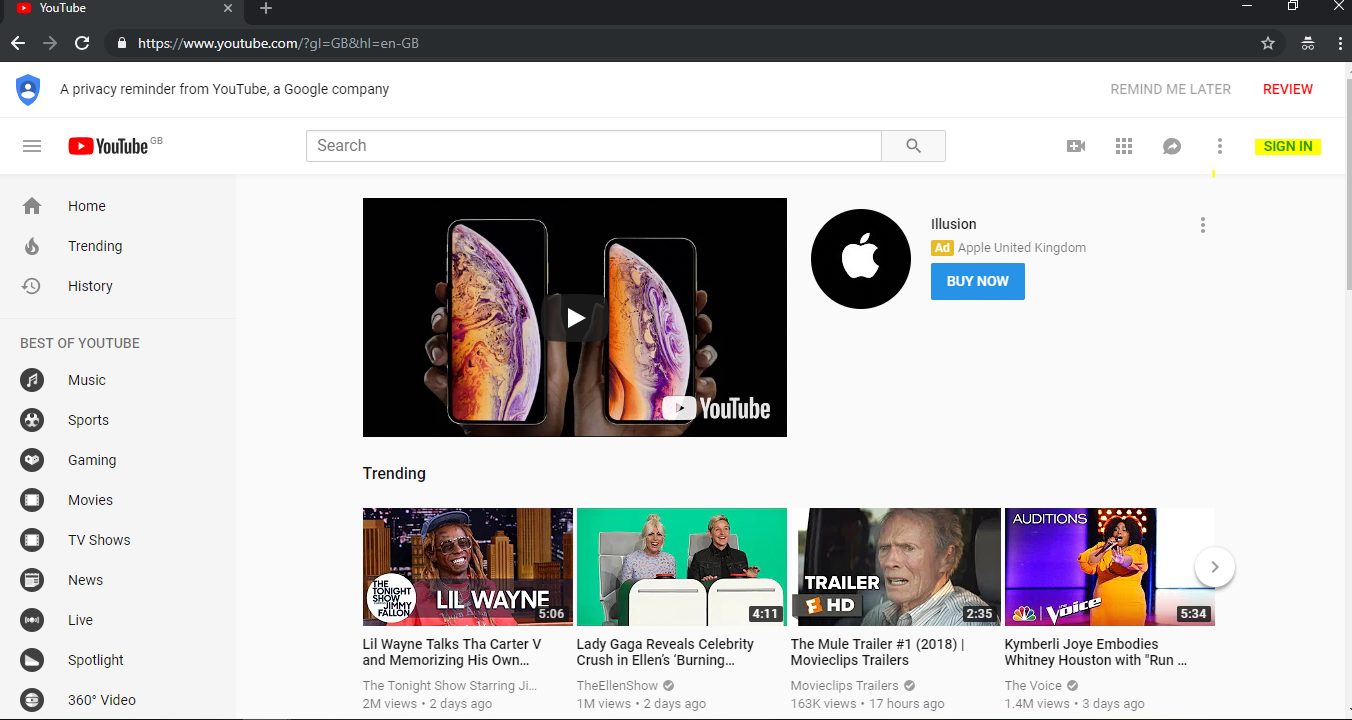 You will then be prompted to sign in. Use the details for the Google account that will be associated with the YouTube channel. Note that the channel can be called something completely different to the name of the Google account.
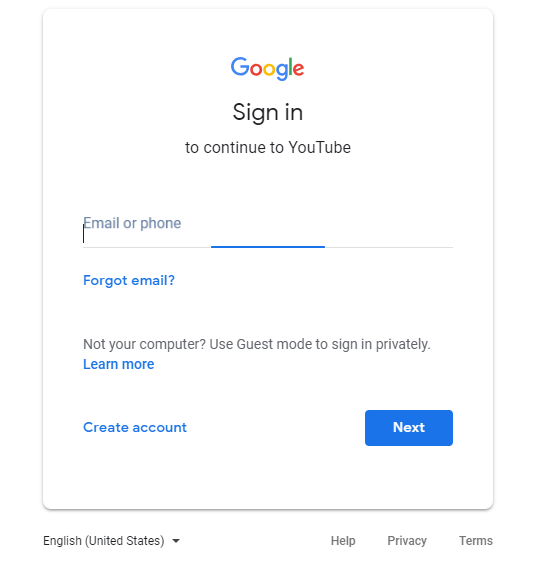 The account you link to only has relevance from a housekeeping perspective – do whatever is easiest for you.
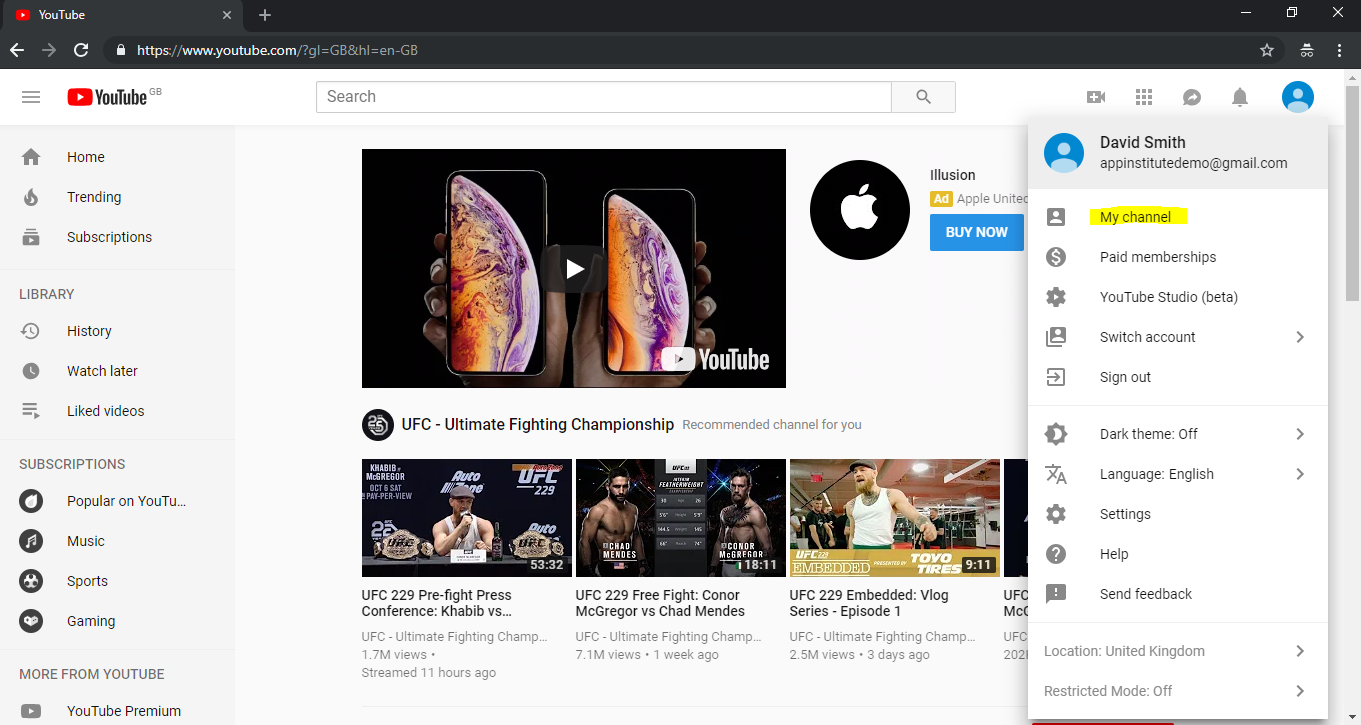
Once you’ve logged in, click on the top-right icon and in the drop-down hit ‘My Channel’.
The account you link to only has relevance from a housekeeping perspective – do whatever is easiest for you.
Once you’ve logged in, click on the top-right icon and in the drop-down hit ‘My Channel’.
Gaming Expansion with Playables
YouTube expanded its platform with Playables, an in-app gaming feature available to all users as of May 2024. By December 2024, the Playables catalog contained over 130 games, offering genres from trivia to sports, accessible across desktop and mobile. The introduction of Playables reflects YouTube’s strategy to diversify content and engage users in interactive entertainment, thus broadening the platform’s appeal. This will pop open a box that invites you to ‘Use YouTube as…’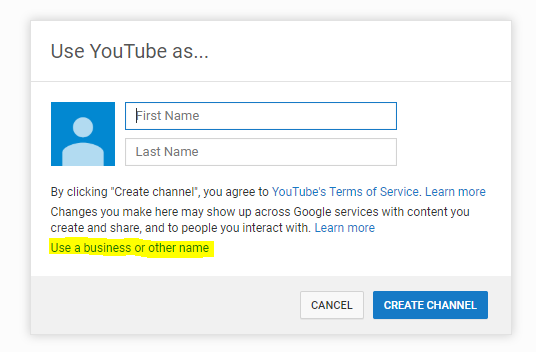 You can use your name in the main box or click ‘Use a business or other name’ below. Most businesses use a business name but if the business is an extension of your brand your name may be relevant.
This will open a window inviting you to add a ‘Brand Account Name’. Add your name and click ‘Create’.
You can use your name in the main box or click ‘Use a business or other name’ below. Most businesses use a business name but if the business is an extension of your brand your name may be relevant.
This will open a window inviting you to add a ‘Brand Account Name’. Add your name and click ‘Create’.
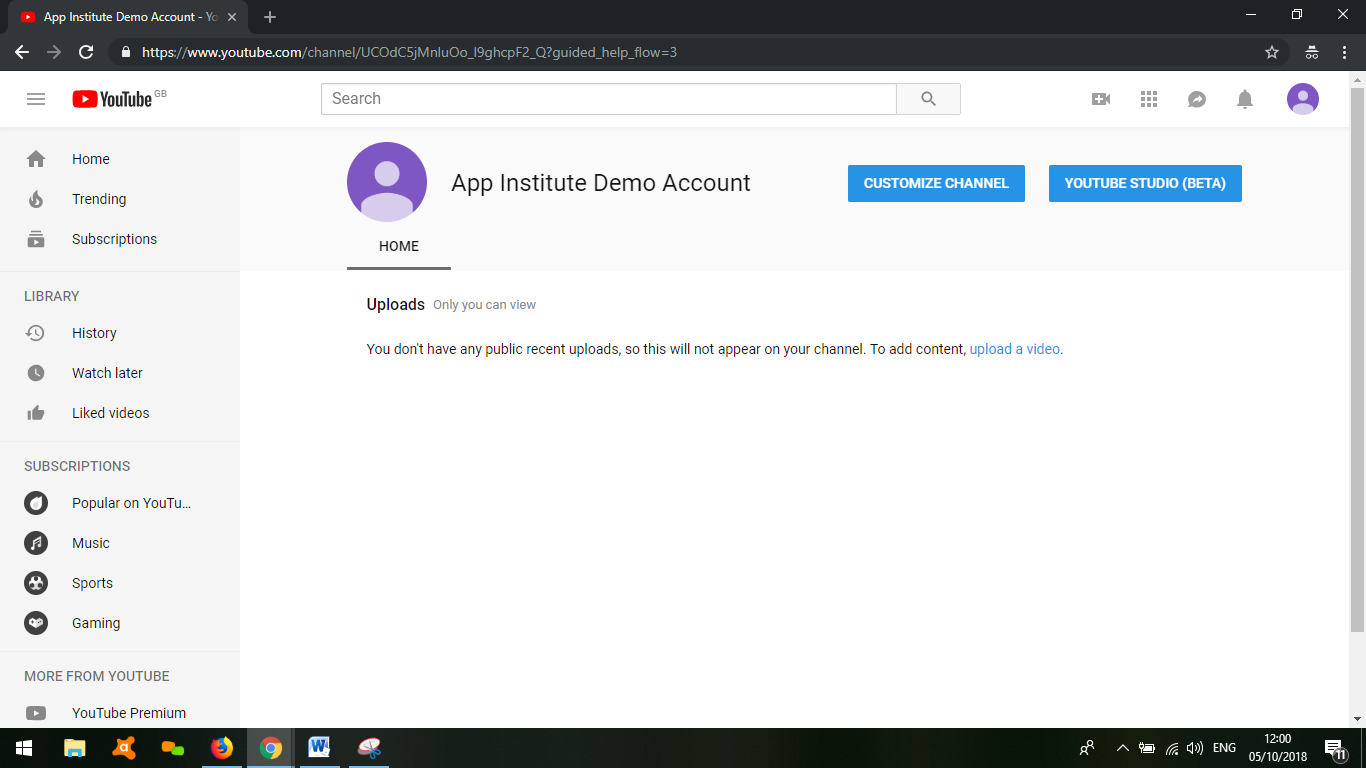
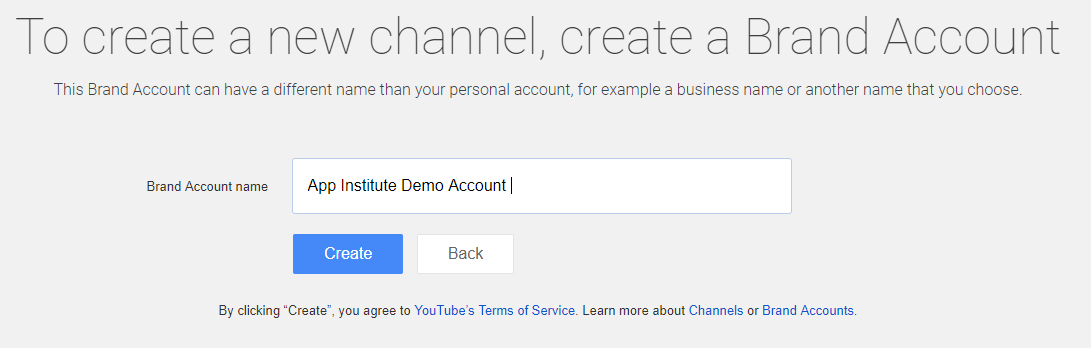 And you’re good to go.
The Look and Feel
YouTube is a very visual medium so getting the homepage looking great is an essential first step.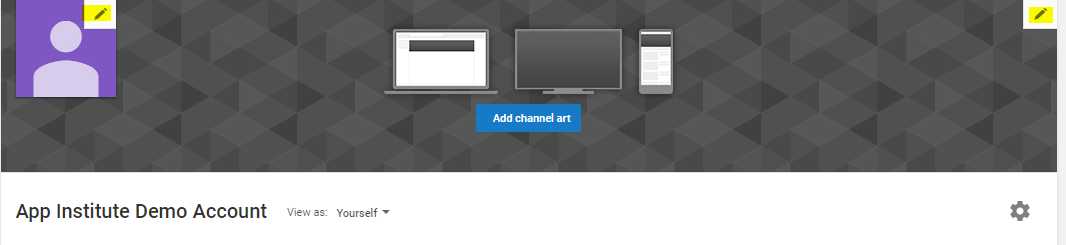 You can add a logo and a backdrop. YouTube help has more information on this; make sure you also check the image file and size guidelines (I’ve added them below for convenience).
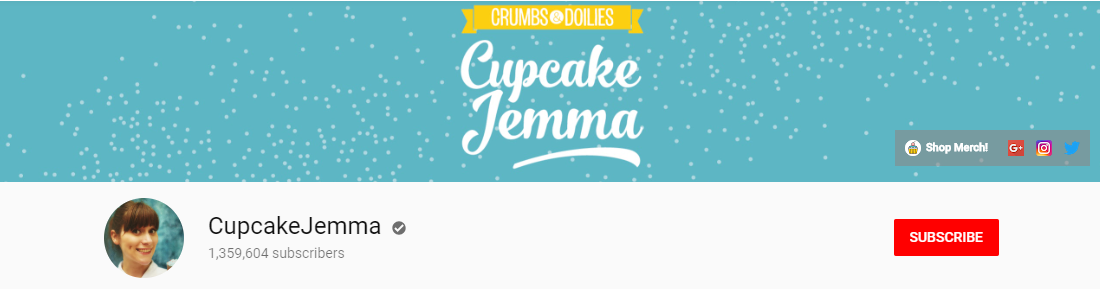
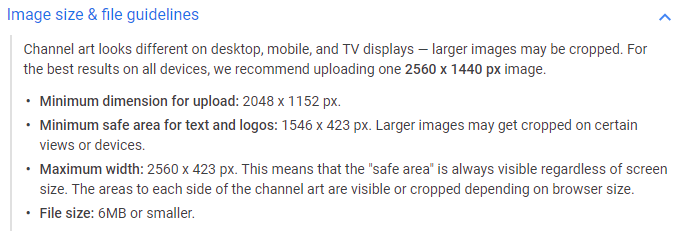 Here are a couple of examples of clean and simple YouTube homepage art.
Cupcake Jemma’s is simple, clean and friendly.
Here are a couple of examples of clean and simple YouTube homepage art.
Cupcake Jemma’s is simple, clean and friendly.
 An incredibly popular channel with cool artwork is VSauce.
 If the design isn’t for you, then use Upwork or 99designs to hire someone for the design aspect. Don’t underestimate this part – it’s a visual platform, so you need to spend time making it look good.
YouTube Shorts Strategy
YouTube Shorts is a feature that allows creators to produce short, engaging videos. These 60-second clips can quickly capture audience attention and showcase creativity. Use Shorts to highlight key content segments, promote upcoming videos, or share quick tips. This format is ideal for reaching mobile users who prefer fast-paced content. Optimize keywords and tags for Shorts to boost visibility in search results.About Section
YouTube calls this a channel description, and it’s a space for you to give an overview of your channel. It’s important for a couple of reasons – it incentivizes visitors to become subscribers, and it can help you appear in YouTube search results. In the YouTube search results, the first 150 characters are displayed so this should entice visitors and optimize for the YouTube search engine. The Jimmy Fallon search below is an example of the YouTube search results.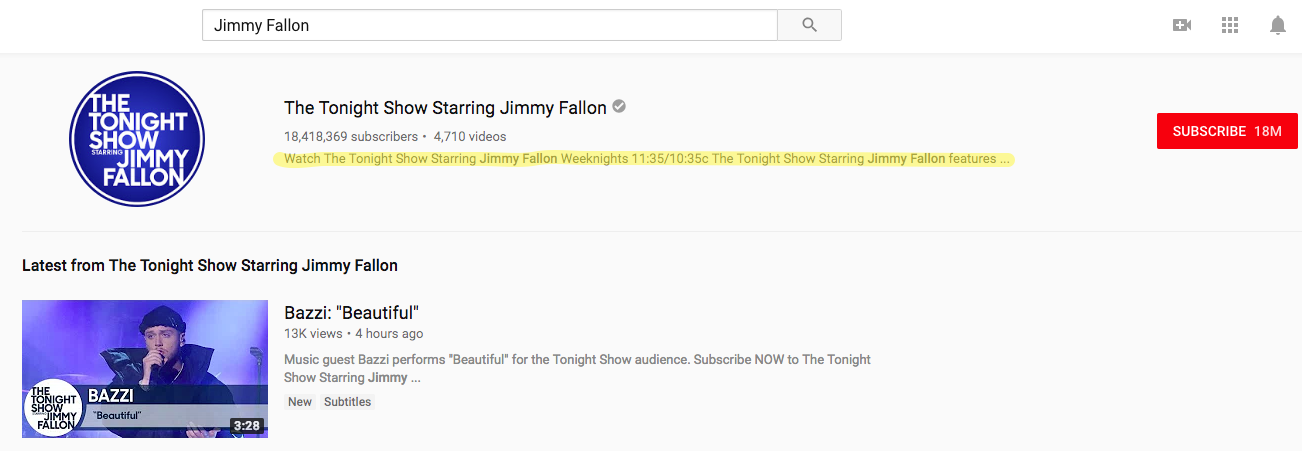 A good channel description should include:
- A clear introduction to what features the channel has to offer.
- An explanation of the benefits a user will get from visiting the channel.
- A clear call to action that drives subscribers.
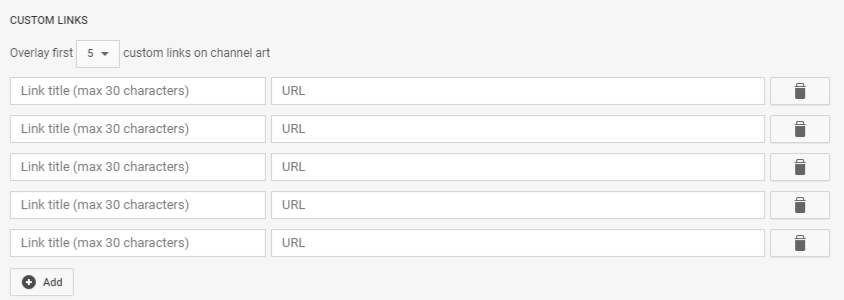
- Links to your homepage, see below.
On-Page Optimisation
Optimization falls into two main buckets:- Attracting visitors.
- Ensuring visitors return.
New Guidelines on Clickbait Titles
In December 2024, YouTube implemented new guidelines to improve content quality by prohibiting clickbait titles. Videos with misleading or sensationalized titles face penalties, including potential removal or channel suspension. These changes, initially rolling out in India and expanding globally, encourage creators to focus on transparency and authenticity, enhancing the overall user experience on YouTube.Attracting Visitors
General SEO principles apply to YouTube. You need to optimize your page so that it is clear to the YouTube algorithms what content you are displaying. These steps will get you started in the right way.Analyze User Behaviour
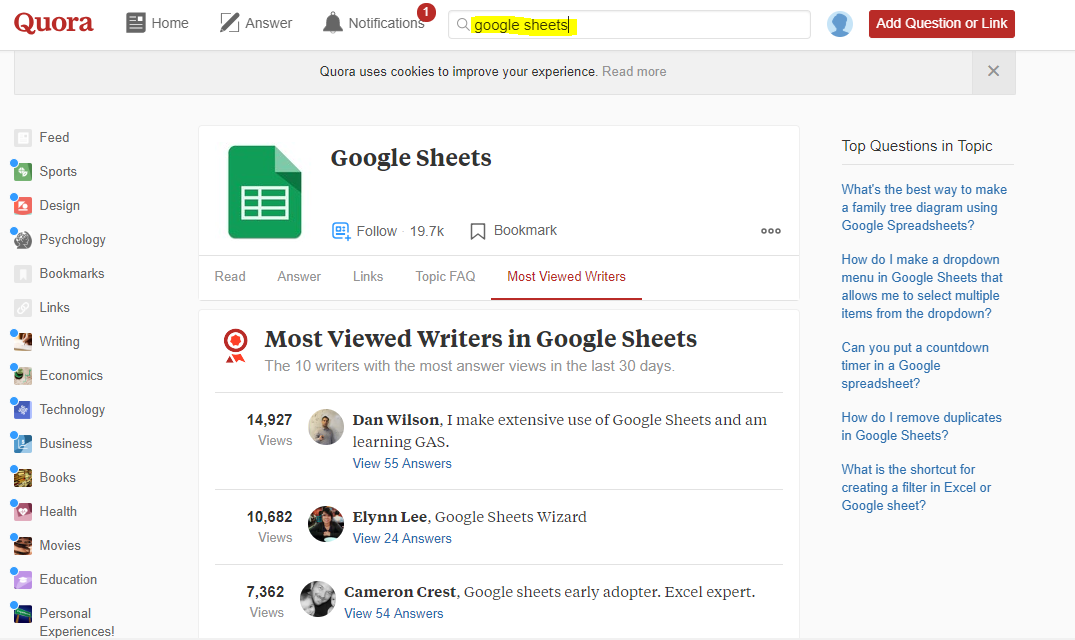 This will help you determine if there is a demand for your idea. You can then think about positioning your business to address customer questions effectively.
Another useful tool is Google Trends; it helps gauge how interesting the audience is finding a topic. Knowing what people are searching for will help you develop content that satisfies these searches. Start by adding the topic to the search bar.
This will help you determine if there is a demand for your idea. You can then think about positioning your business to address customer questions effectively.
Another useful tool is Google Trends; it helps gauge how interesting the audience is finding a topic. Knowing what people are searching for will help you develop content that satisfies these searches. Start by adding the topic to the search bar.
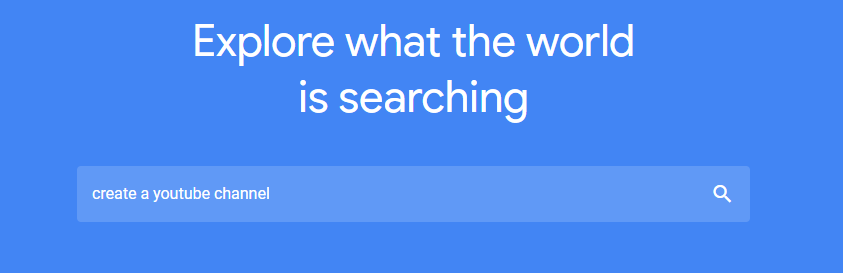 Then click on the ’YouTube Search’ which is nested under ‘Web Search’.
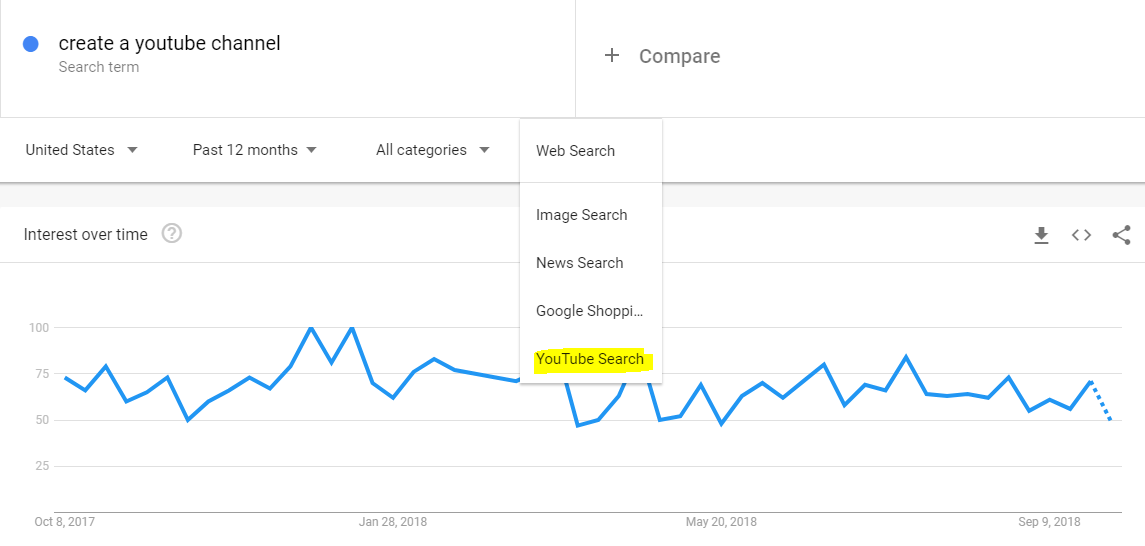 On the results page you can cut the data in different ways:
- Country
- Time Period
- By sub-category
- Compare with other terms
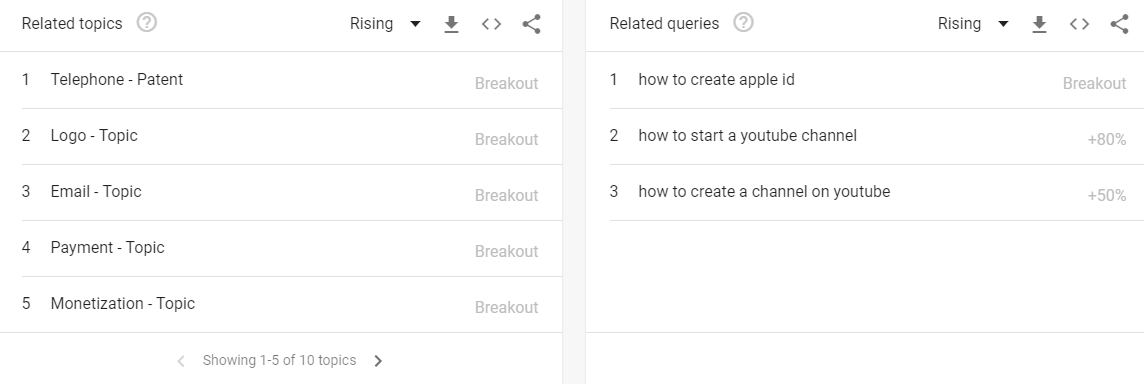 There are many ways to analyze user behavior and whatever technique you use to make sure it’s focused on determining the demand for a topic so you can be sure there is an audience for the content.
There are a number of tools that can give deeper insight into search volumes and how difficult terms are to rank for. Moz and Ahrefs are two respected solutions.
There are many ways to analyze user behavior and whatever technique you use to make sure it’s focused on determining the demand for a topic so you can be sure there is an audience for the content.
There are a number of tools that can give deeper insight into search volumes and how difficult terms are to rank for. Moz and Ahrefs are two respected solutions.
Using YouTube Analytics for Channel Growth
YouTube Analytics offers a wealth of data to refine your strategy. Track audience demographics to tailor content to viewer preferences. Monitor video performance metrics like watch time and engagement rates to identify successful content types. Analyze traffic sources to understand how viewers find your videos, guiding marketing efforts. Regularly reviewing this data helps identify trends and refine content strategies for growth.Video Optimisation
The principles are much the same to optimizing a blog post. Let’s look at five of the key optimization techniques. We’re going to look at:- Video Title
- Description
- Tags
- Thumbnails
- Transcripts
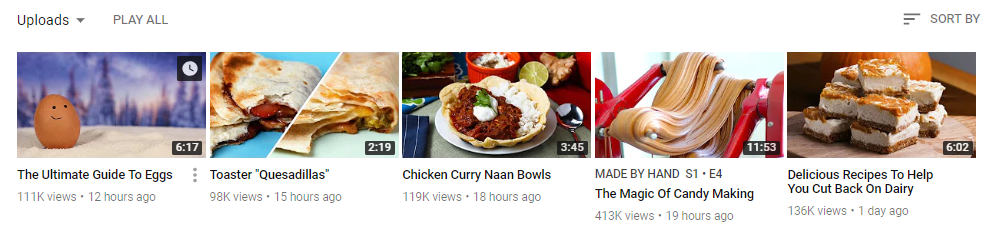 The second tactic is including keywords in the description. You have 5000 characters to play with, so you can be a little more natural in how you include the keyword, with all that space you can also add multiple keywords. You can also include links to other relevant content. As with all optimization, it should seem relevant and natural to the audience.
The third tactic is adding tags to videos, which can help your video appear in related searches. There is a 500-word limit, and you can use this space to add related terms. It’s questionable how much this really helps, and no one really knows – it certainly can’t hurt.
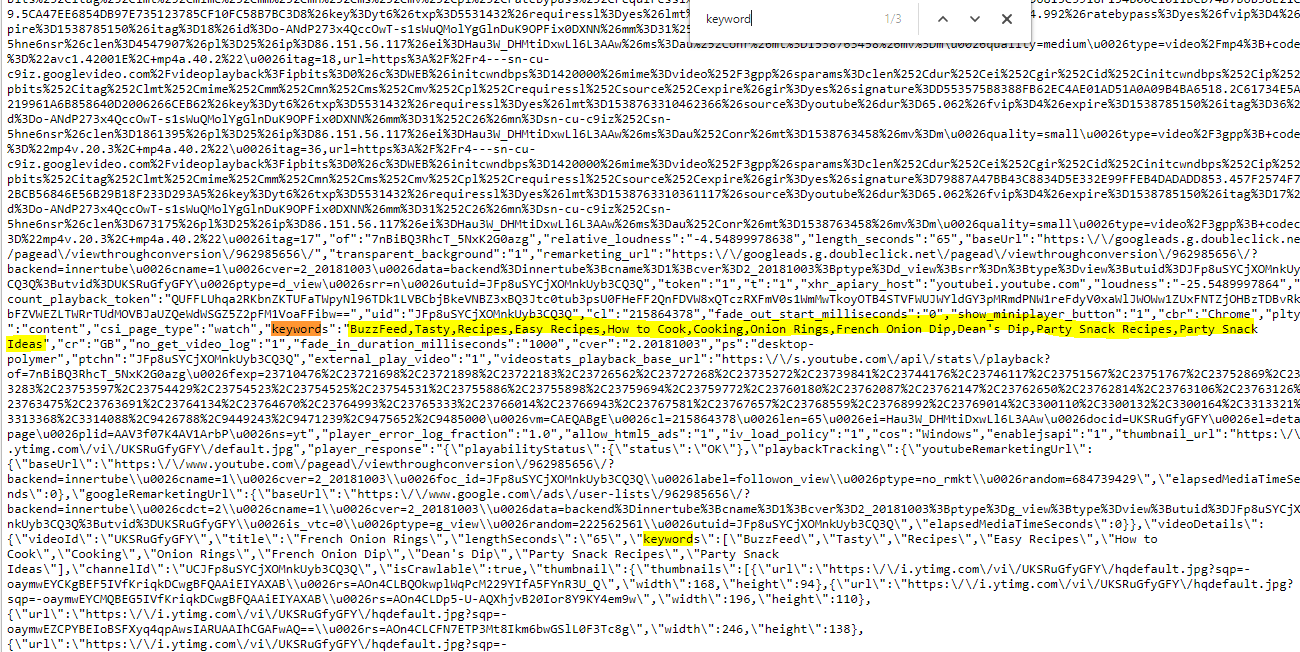
You can see the tags for a YouTube page by pressing CTRL+U which will bring up the underlying code and then CTRL+F and type ‘keyword’, helpful when you’re snooping around competitors. It will look something like this.
The second tactic is including keywords in the description. You have 5000 characters to play with, so you can be a little more natural in how you include the keyword, with all that space you can also add multiple keywords. You can also include links to other relevant content. As with all optimization, it should seem relevant and natural to the audience.
The third tactic is adding tags to videos, which can help your video appear in related searches. There is a 500-word limit, and you can use this space to add related terms. It’s questionable how much this really helps, and no one really knows – it certainly can’t hurt.
You can see the tags for a YouTube page by pressing CTRL+U which will bring up the underlying code and then CTRL+F and type ‘keyword’, helpful when you’re snooping around competitors. It will look something like this.
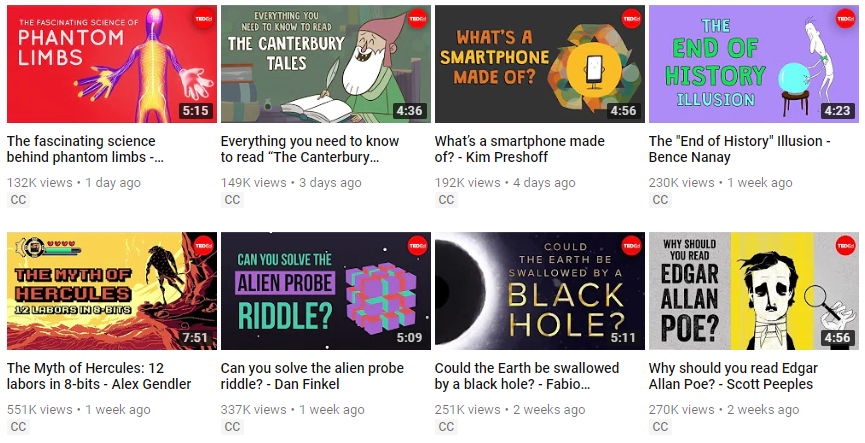
 The fourth tactic is thumbnails and they’re important for enticing users to click. YouTube’s ranking algorithm almost certainly factors click-through rate. Here are some examples of thumbnails that capture viewers:
TED-Ed
The well-known brand has a fun and friendly thumbnail strategy.
The fourth tactic is thumbnails and they’re important for enticing users to click. YouTube’s ranking algorithm almost certainly factors click-through rate. Here are some examples of thumbnails that capture viewers:
TED-Ed
The well-known brand has a fun and friendly thumbnail strategy.
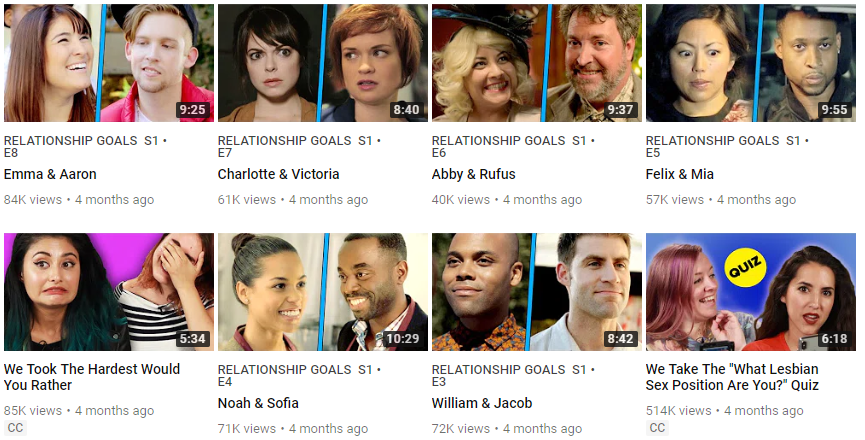
 BuzzFeed Violet
BuzzFeed’s series of short videos of people in relatable situations has a consistent thumbnail policy. They use pictures of people facing everyday problems – it’s designed to make you wonder about the people in the thumbnail, so you click and find out more.
BuzzFeed Violet
BuzzFeed’s series of short videos of people in relatable situations has a consistent thumbnail policy. They use pictures of people facing everyday problems – it’s designed to make you wonder about the people in the thumbnail, so you click and find out more.
 The final tactic is to optimize your transcripts. Google has some tips for creating a transcript file that is worth a close look. The key point is that you can use transcripts for YouTube SEO but do this by producing accurate transcripts rather than just adding keywords. This means your focus should be on making sure keywords are mentioned in the video.
Make Sure Visitors Return
The bottom line for YouTube business channel success is making sure visitors return. You need to make your content a) exceptional and b) targeted at a genuine need. It’s worth reminding ourselves what works – according to Statista these are the YouTube channels with the largest subscription bases. Granted, most of these aren’t conventional businesses (although they will have a commercial element) but it’s useful to see what works well on YouTube to spark inspiration.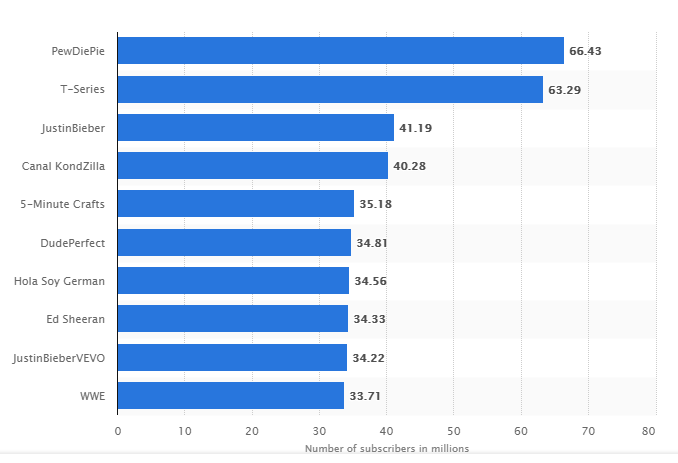 We’re going to look at eight tactics for making your business YouTube channel a hit.
- Have a Signature Production Style. This tactic has been used by TV producers for years, and the point is to make viewers comfortable with your style, so they know what to expect. This can be achieved in a number of ways: title, intro music, style of video, length of the video, the content of the video and closing section. Familiarity helps build your brand.
- A clear value proposition. This is just a fancy way of saying that your videos should offer a ton of value. That value proposition could be anything but ideally tap into a big audience need. These are some examples:
- Easy to follow DIY videos for people with no experience.
- The best goals from around the world for football fans.
- Advanced Excel tips for finance professionals.
- Post regularly. This means you’ll appear in more searches, improve your YouTube SEO and get viewers accustomed to watching.
- Use a hook to keep people viewing your videos. With YouTube, there is a world of opportunity, and literally millions of videos to watch. You only have a very short window to keep people watching your video. A keyword here is curiosity: you need to make the viewer think that watching will be useful and/or entertaining.
- End screens. These should lead to the promotion of other videos and/or calls to action that engages the audience further. You need to make the transition to the end screen as natural as possible so viewers stay on the video. If it just cuts abruptly this tells the viewer the video is over and they can move on – so keep it integrated.
- Have different types of videos on your platform. As we’ve already mentioned different videos will engage different audiences, and some people will enjoy engaging across all of your videos. There is a tactic called “hub, hero and help” that covers three types of video.
Audience Engagement Techniques
Building a loyal community involves active engagement. Reply to comments promptly to encourage viewer interaction. Use polls and questions to solicit feedback and foster a sense of belonging. Livestreams provide real-time engagement opportunities and allow for deeper viewer connections. Encourage viewers to subscribe and turn on notifications for updates. Consistent engagement builds community loyalty and encourages return visits.Off-Page Promotion
This is a series of tactics to drive viewers to your Business YouTube channel. You are only limited by your imagination. Promoting your business channel on your other channels (blog, email signature, email list), contributing to other communities like Quora and Facebook, sponsoring events and appearing on other channels are all good tools. There will be a lot of trial and error in promotion until you find a medium that works. Don’t be afraid to be creative here. An interesting PR angle, appearing on a radio show or handing out flyers dressed as a Panda may all be right for your business in the race for subscribers.Collaborations and Partnerships
Collaborations with other YouTube creators can offer mutual benefits. By partnering with channels that share similar audiences, you can expand your reach. Joint projects expose your content to new viewers and foster cross-promotion. Interactive sessions or joint videos create engaging content while nurturing community bonds. Seek partners whose values align with yours for a cohesive collaboration. A word of caution: don’t get addicted to novelty. Using mainly tried and tested techniques like building your profile by contributing helpfully to the community, generating links from high authority sites and being a guest contributor should all be your focus.YouTube Ads
Unsurprisingly, YouTube advertising works in much the same way as Google AdWords; you can read more and get started here. The medium allows you to select a video to promote, choose a title and description. Once you’ve built the video advert you need to decide where to send clicks – this can be to your YouTube channel or website. Then you can set a daily budget and target audience. While these ads are simple to set up, a lot of people waste time on paying for traffic because they haven’t built a campaign focused on the audience they’re attracting. Make sure that there is a clear reason why your target audience will click on your video. Once they’ve clicked on your video, have clarity on what you will do with their attention. Sell them something, add them to a mailing list, add them as a subscriber.Changes in Ad Blocker Policies
Starting in June 2024, YouTube began enforcing stricter measures against ad blockers by implementing Manifest V3. This update allows YouTube to integrate ads directly into the video stream, making them less susceptible to blocking attempts. Users must now either allow ads or opt for the ad-free YouTube Premium subscription. These changes align with YouTube’s continuous efforts to preserve its primary revenue streams from advertising. As an example, Lego took advantage of people searching for 360-degree videos by building a video advert that appeared when people type in “360” video. This is effective because Lego has 360-degree videos that are impressive. I’d guess Lego has stipulated this appears on searches for a certain demographic or people that have been engaged with Lego (like me when writing an earlier part of this article). The video is designed to pique user interest and build their subscriber base.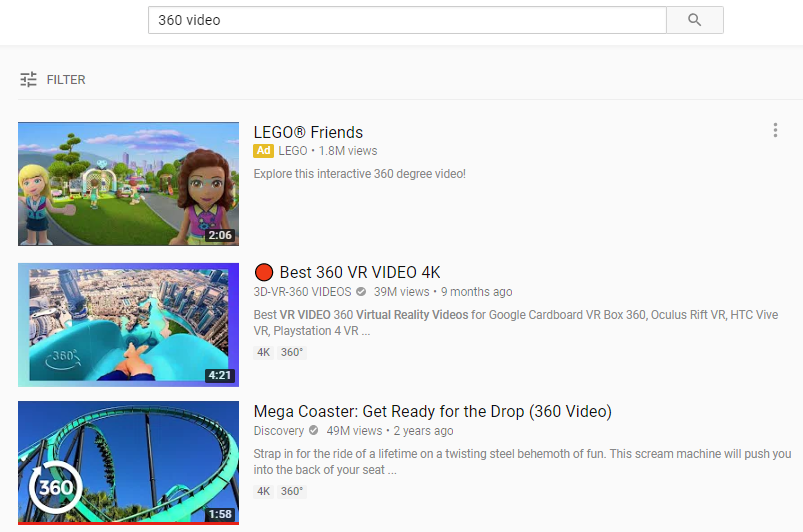
Conclusion
Setting up a business YouTube channel offers an incredible medium for many businesses. The most pressing question for you should be: Is YouTube right for my business? The second question is: Do I have the resources to realize my vision for the channel? Building and running a YouTube channel is time-consuming, so make sure your answer to the above questions is yes and yes. If you are convinced of the business case and plan to press ahead, we’d advise getting your hands dirty and experimenting. It will likely take some experimentation before you get into a groove of producing content that delivers results. Every polished YouTube channel you see today had humble beginnings so don’t be put off. As a medium, YouTube is set to grow, so go and get started.
2 thoughts on “How to Create a Winning Business YouTube Channel”