For years, PDFs have been the standard way businesses share information.
Restaurants share menus.
Companies distribute brochures.
Schools send guides and handbooks.
Retailers publish catalogues.
But there’s one problem.
PDFs aren’t particularly engaging. They’re static, difficult to navigate on phones, and rarely encourage interaction.
That’s why many businesses are now searching for ways to convert a PDF to an app.
Instead of sending customers a document, they provide a mobile experience that’s easier to browse, easier to update, and far more engaging.
The good news is that modern tools make this surprisingly simple.
What Does “PDF to App” Actually Mean?
Converting a PDF to an app means transforming the content inside a PDF into a mobile-friendly experience.
Rather than downloading a document, users can interact with the content inside a mobile application.
Depending on the platform used, this might include:
-
Interactive menus or product listings
-
Clickable sections and navigation
-
Built-in ordering or booking features
-
Contact and location tools
-
Image galleries and videos
Instead of a static document, your content becomes something users can actively engage with.
Why Businesses Are Converting PDFs Into Apps
There are several reasons businesses are looking for a PDF to app maker rather than simply sharing documents.
1. Mobile-Friendly Experiences
Most PDFs were originally designed for desktop viewing.
On mobile devices they can feel clunky. Users often need to zoom in, scroll around, and search manually.
Apps are built specifically for phones, making them far easier to use.
2. More Engagement
An app allows users to interact with your content.
For example:
-
Restaurants can enable ordering from a menu
-
Retailers can allow customers to browse and buy products
-
Events can include ticket booking
-
Businesses can add enquiry forms
This turns a document into a tool.
3. Real-Time Updates
Updating a PDF often means creating a new file and sending it again.
Apps allow content to be updated instantly.
If a menu changes or a product sells out, it can be updated without asking users to download a new document.
4. Direct Communication
Apps also allow businesses to communicate directly with users.
Push notifications can be used to:
-
announce new products
-
promote special offers
-
share updates or news
This simply isn’t possible with a PDF.
Examples of PDFs That Work Well as Apps
Many types of documents can be turned into interactive apps.
Here are a few examples.
Restaurant Menus
One of the most common uses for a PDF to app maker is converting restaurant menus into mobile apps.
Instead of sending customers a PDF menu, restaurants can create an app where customers can:
-
browse dishes
-
see photos
-
place orders
-
receive offers
In our experience, this creates a much smoother experience for customers than viewing a static menu.
Product Catalogues
Retailers often distribute large PDF catalogues.
Turning these into an app allows customers to:
-
browse categories
-
view product images
-
purchase items directly
The catalogue becomes a shopping experience rather than a document.
Event Guides
Events and conferences frequently produce PDF programmes.
A mobile app version can include:
-
schedules
-
speaker profiles
-
venue maps
-
live updates
Attendees can navigate information much more easily.
School Handbooks
Schools often distribute large PDF guides covering policies, schedules, and announcements.
Converting these into apps allows parents and students to quickly find information without scrolling through long documents.
Company Brochures
Many businesses still send marketing brochures as PDFs.
A mobile app version allows companies to include:
-
image galleries
-
videos
-
contact forms
-
enquiry buttons
This makes the content far more engaging.
How a PDF to App Maker Works
Modern PDF to app makers use a simple process to convert documents into app content.
Here’s how it typically works.
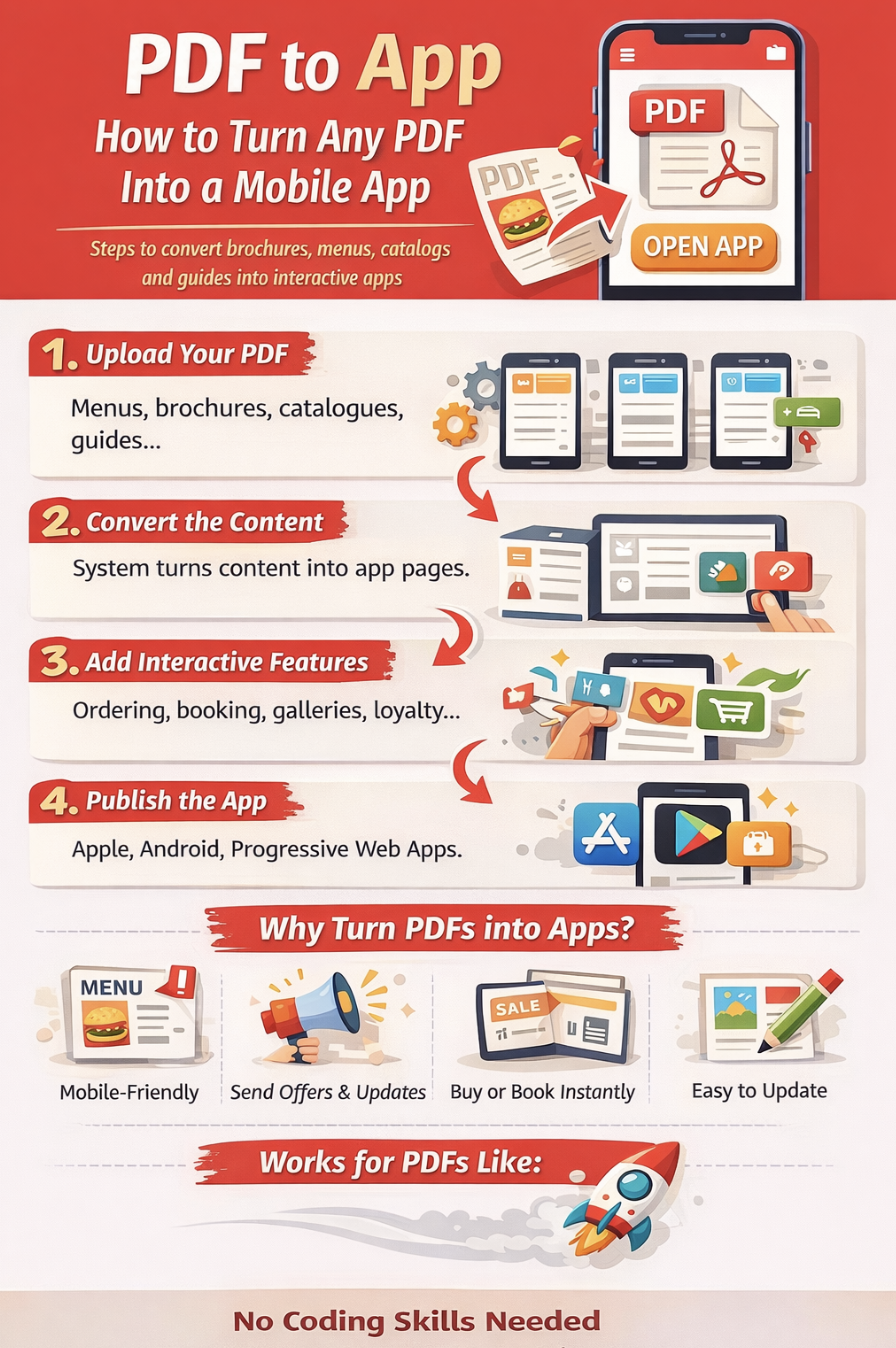
Step 1: Upload Your PDF
The first step is uploading the document.
This might be a:
-
menu
-
brochure
-
catalogue
-
guide
-
product list
The system then reads and extracts the information.
Step 2: Convert the Content
Once the PDF is uploaded, the content can be converted into structured app sections.
For example:
-
headings become categories
-
images become galleries
-
text becomes content pages
-
products become listings
Instead of manually copying everything, much of the content can be generated automatically.
Step 3: Add Interactive Features
This is where apps become more powerful than PDFs.
Depending on the use case, you can add:
-
ordering
-
booking forms
-
product checkout
-
loyalty programmes
-
notifications
The document becomes a functional tool rather than a simple file.
Step 4: Publish the App
Once the content is ready, the app can be published to mobile platforms such as:
-
Apple App Store
-
Google Play Store
-
Progressive web apps for instant access
Users can then access the content easily from their phones.
Turning PDFs Into Apps in Minutes
Many people assume converting a PDF to an app requires development skills.
In reality, modern platforms make the process very straightforward.
For example, on our platform you can:
-
upload PDF menus or brochures
-
upload CSV files containing products or content
-
upload images of printed materials
The system can automatically convert these into app content.
This means you don’t have to manually recreate everything from scratch.
In our experience, this dramatically reduces setup time for businesses that want to launch an app quickly.
When Should You Turn a PDF Into an App?
Converting a PDF into an app makes sense when the content is regularly used or updated.
Common scenarios include:
-
restaurant menus
-
product catalogues
-
event guides
-
educational resources
-
company brochures
If people frequently access the document on their phones, an app usually provides a better experience.
The Future of Digital Documents
Traditional documents still have their place.
But more businesses are now shifting toward interactive experiences.
Instead of sharing static PDFs, they are creating mobile apps that allow customers to browse, interact, and take action.
A PDF to app maker bridges the gap between simple documents and full mobile apps.
It allows businesses to reuse their existing content while creating a much richer experience for users.
Final Thoughts
If you already have content in PDF format, turning it into an app is often easier than starting from scratch.
Menus, brochures, catalogues, guides, and handbooks can all be transformed into mobile experiences that are easier to use and more engaging.
With modern tools, converting a PDF to an app can take minutes rather than months.
And once the content lives inside an app, it becomes far more powerful than a simple document.
FAQ
What is a PDF to app maker?
A PDF to app maker is a platform that converts PDF documents into mobile apps by transforming the content into interactive app pages.
Can a PDF really be turned into an app?
Yes. Modern tools can extract text, images, and sections from PDFs and convert them into mobile-friendly app content.
Do I need coding skills to convert a PDF to an app?
No. Most PDF to app makers are no-code platforms designed for non-technical users.
What types of PDFs work best as apps?
Menus, catalogues, brochures, guides, and directories are particularly well suited for conversion into apps.
Can I update the content after converting a PDF?
Yes. Most platforms allow you to update the content without needing to upload a new PDF every time.
Last Updated on March 13, 2026 by Becky Halls
0 thoughts on “PDF to App: How to Turn Any PDF Into a Mobile App”