Features / Workforce
Shift Scheduler
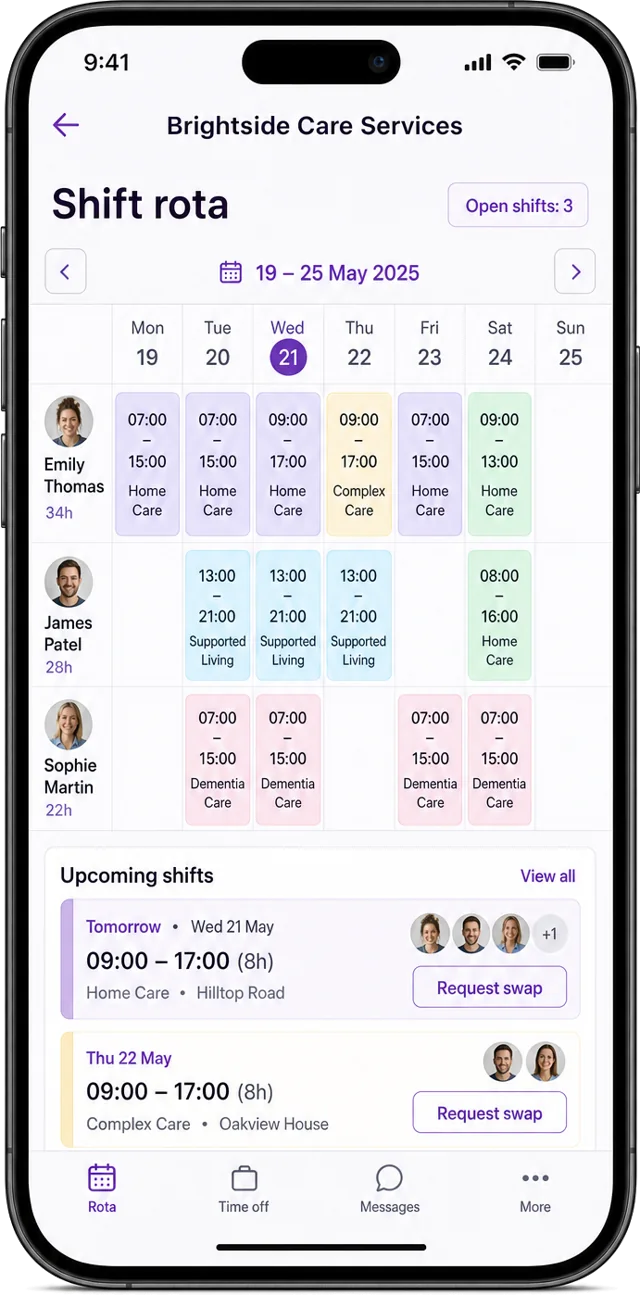
The rota, on every phone that needs it. Build shifts with roles and locations, publish, and staff see their week in the app. Open shifts can be claimed, swaps requested, and every change goes out as a push notification.
- Shifts with title, date, time, role and location
- Open shifts staff can claim; swap requests with approval
- Push notifications when a rota changes
Included on every plan, including Free. No credit card required.
Shift Scheduler: the quick answer
- What it is
- Publish rotas with roles and locations, let staff pick up open shifts and request swaps, all from the app with push notifications for changes.
- Cost
- Included on every AppBuild.diy plan, including Free for up to 10 app users. Business is $49/month for up to 1,000 users and Business Pro is $99/month for unlimited users.
- Works on
- Your app on the App Store, Google Play and as an installable web app, from one setup.
- Setup
- Add it in the AppBuild.diy editor and fill in your details. No code.
- Popular with
- Live music venue, Bakery, Escape room, Takeaway
What the shift scheduler does for your business
Fewer gaps, fewer group-chat messages, and a rota everyone can see.
Fill gaps fast
Post an open shift and the first person to claim it has it.
Stop the WhatsApp rota
The rota is in the app, with push for changes.
Keep roles straight
Shifts carry a role, so the right people see the right shifts.
How it works
Set it up once in the AppBuild.diy editor. Your customers get it in the app the same day.
You set it up
- Add Shift SchedulerOpen Pages, tap Add Page or Function and choose Shift Scheduler.
- Create shiftsTitle, date, start and end, role, location.
- Publish the weekStaff get a push notification.
- Handle swapsApprove or decline swap requests in Data Manager.
Your customers see
- See the weekTheir shifts, by day.
- Claim open shiftsOne tap on an open shift.
- Request a swapPick a shift and ask.
- Get notifiedPush when the rota changes.
Full step-by-step guide with screenshots: AppBuild.diy user guide →
Who uses it
Hospitality, care, retail, events and any team working shifts.
Included on every plan
- Free for up to 10 app users, then $49/month for up to 1,000
- Works in the web app (PWA), on iOS and on Android
- 0% commission on paid plans
- Unlimited push notifications to go with it
- Switch it on or off from the editor at any time
Works well with
Timesheets
Staff clock in and out from the app, against a job or site, with breaks and weekly submission. Hours land in your dashboard, not on paper.
Job Board
Post vacancies in your app and take applications with CV, cover letter and screening questions. Recruit from the people who already know you.
Push Notifications
Unlimited push notifications on every plan, including Free, at $0 per message. The lock-screen channel that email and social cannot match.
Shift Scheduler questions
Can staff see other people's shifts?
You choose: their own shifts only, or the whole rota.
Can I copy last week's rota?
Yes. Duplicate a week and adjust.
Does it work with Timesheets?
Yes. Shifts and clocked hours sit side by side in Data Manager.
What is Shift Scheduler in AppBuild.diy?
Publish rotas with roles and locations, let staff pick up open shifts and request swaps, all from the app with push notifications for changes.
Does Shift Scheduler work on iPhone and Android?
Yes. It works in your app on the App Store and Google Play, and in the installable web app, from the same setup.
Do I need to code to add Shift Scheduler?
No. You add Shift Scheduler in the AppBuild.diy editor and fill in your details. Most businesses are live in 5 to 15 minutes.
Which businesses use Shift Scheduler?
It is popular with Live music venue, Bakery, Escape room, Takeaway, among others.