Features / Forms & Data
Form Builder
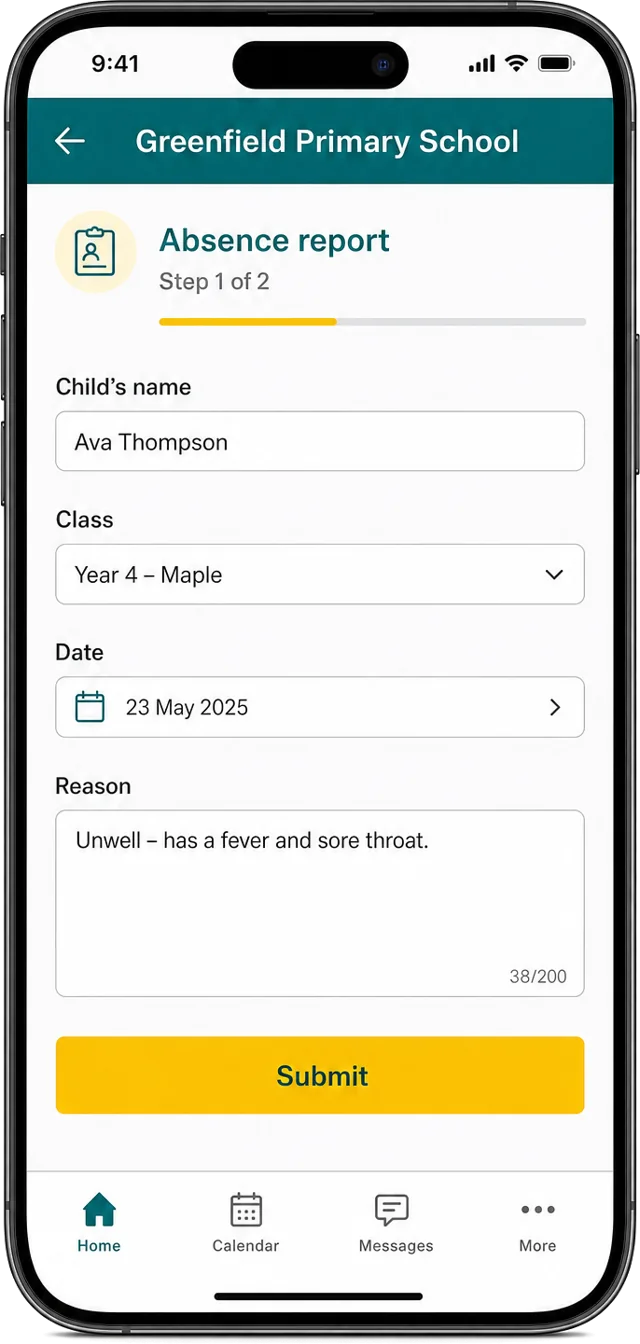
Any structured request your business takes, as a form in your app. Quote requests, absence reports, prayer requests, membership applications. Build it in the editor with the question types you need, and every response lands in Data Manager.
- Short answer, long answer, email, choices, dates and more
- Required fields, thank-you message and email notifications
- Responses stored in Data Manager under Forms
Included on every plan, including Free. No credit card required.
Form Builder: the quick answer
- What it is
- Custom forms for quotes, requests, applications and feedback. Build from scratch or a template; responses arrive in your dashboard with email alerts.
- Cost
- Included on every AppBuild.diy plan, including Free for up to 10 app users. Business is $49/month for up to 1,000 users and Business Pro is $99/month for unlimited users.
- Works on
- Your app on the App Store, Google Play and as an installable web app, from one setup.
- Setup
- Add it in the AppBuild.diy editor and fill in your details. No code.
- Popular with
- Dental practice, Florist, Escape room, Climbing gym
What the form builder does for your business
Replace the phone call that always misses a detail.
Get the full picture first time
Required fields mean you get the room number, the date, the photo, before you reply.
Keep every response
Submissions are stored and searchable, not buried in email.
Start from a template
Contact, quote, feedback and application templates to adapt.
How it works
Set it up once in the AppBuild.diy editor. Your customers get it in the app the same day.
You set it up
- Add Form BuilderOpen Pages, tap Add Page or Function and choose Form Builder.
- Start from scratch or a templateName the form and add your first question.
- Add and organise questionsPick question types, mark fields required, reorder with the arrows.
- Set notifications and the thank-you messageAdd a notification email if you want alerts, write the confirmation, save.
Your customers see
- Open the formFrom the page you named, for example Contact or Request a quote.
- Fill it inClear fields with placeholders and required markers.
- SubmitA thank-you message confirms it.
- Review laterSigned-in users can see what they submitted under My Submissions.
Full step-by-step guide with screenshots: AppBuild.diy user guide →
Who uses it
Trades, schools, churches, hotels, clubs and any business that takes requests.
Included on every plan
- Free for up to 10 app users, then $49/month for up to 1,000
- Works in the web app (PWA), on iOS and on Android
- 0% commission on paid plans
- Unlimited push notifications to go with it
- Switch it on or off from the editor at any time
Works well with
Messages
One-to-one messaging between you and your app users. Enquiries, support and bookings questions in one inbox, with push alerts both ways.
Document Library
A categorised library of PDFs and documents your customers or members can read and download in the app: menus, newsletters, policies, term dates.
Form Builder questions
Where do responses go?
Data Manager, under Forms. Select the app and form to review submissions. Add a notification email for alerts.
Can I attach files or photos to a form?
Yes. Add a file or photo question type.
Can a customer see what they sent?
Yes, with the My Submissions feature.
What is Form Builder in AppBuild.diy?
Custom forms for quotes, requests, applications and feedback. Build from scratch or a template; responses arrive in your dashboard with email alerts.
Does Form Builder work on iPhone and Android?
Yes. It works in your app on the App Store and Google Play, and in the installable web app, from the same setup.
Do I need to code to add Form Builder?
No. You add Form Builder in the AppBuild.diy editor and fill in your details. Most businesses are live in 5 to 15 minutes.
Which businesses use Form Builder?
It is popular with Dental practice, Florist, Escape room, Climbing gym, among others.