
Features / Communication
Messages
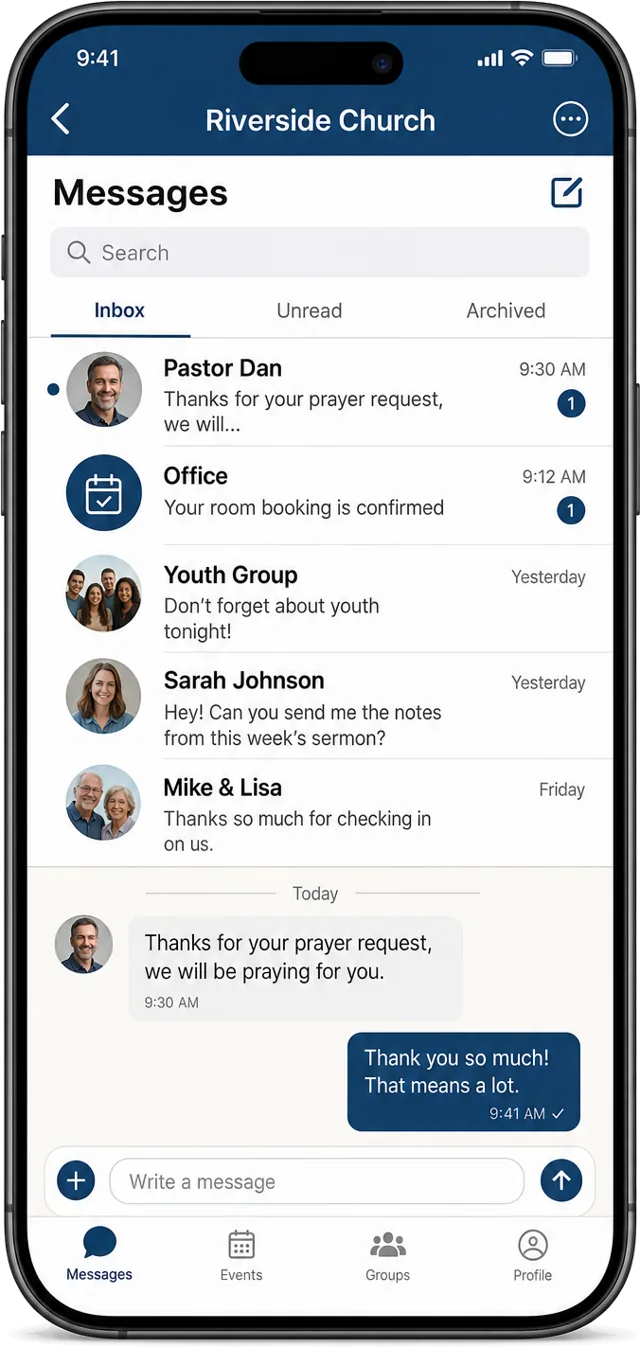
A direct line that is not a phone number or a social DM. Customers message you from the app, you reply from the Data Manager, and both sides get a push notification when there is something new.
- Customer-to-business messaging inside the app
- Replies from the free Data Manager app
- Push notification on every new message, both ways
Included on every plan, including Free. No credit card required.
Messages: the quick answer
- What it is
- One-to-one messaging between you and your app users. Enquiries, support and bookings questions in one inbox, with push alerts both ways.
- Cost
- Included on every AppBuild.diy plan, including Free for up to 10 app users. Business is $49/month for up to 1,000 users and Business Pro is $99/month for unlimited users.
- Works on
- Your app on the App Store, Google Play and as an installable web app, from one setup.
- Setup
- Add it in the AppBuild.diy editor and fill in your details. No code.
- Popular with
- Vacation rental, Twitch streamer, YouTuber, Live music venue
What messages do for your business
Answer the question before they ring, and keep the conversation where you can find it.
Fewer phone calls
Opening hours, availability, a quick question: answered in a message.
One inbox
Every conversation in Data Manager, not scattered across WhatsApp, Instagram and email.
Replies that get read
A push notification tells the customer you have answered.
How it works
Set it up once in the AppBuild.diy editor. Your customers get it in the app the same day.
You set it up
- Add MessagesOpen Pages, tap Add Page or Function and choose Messages.
- Set a welcome messageWhat customers see when they open a new conversation.
- Reply from Data ManagerConversations appear with push alerts for new messages.
- Share the loadAny team member with Data Manager can reply.
Your customers see
- Open MessagesStart a conversation or continue one.
- SendText and photos.
- Get the replyA push notification brings them back to the thread.
Full step-by-step guide with screenshots: AppBuild.diy user guide →
Who uses it
Service businesses, churches, clubs and anywhere customers have questions before they book or buy.
Included on every plan
- Free for up to 10 app users, then $49/month for up to 1,000
- Works in the web app (PWA), on iOS and on Android
- 0% commission on paid plans
- Unlimited push notifications to go with it
- Switch it on or off from the editor at any time
Works well with
Form Builder
Custom forms for quotes, requests, applications and feedback. Build from scratch or a template; responses arrive in your dashboard with email alerts.
Push Notifications
Unlimited push notifications on every plan, including Free, at $0 per message. The lock-screen channel that email and social cannot match.
Contact Us
Address and map, call and email buttons, opening hours and social links on one page. The home for your business details in the app.
Messages questions
Is this a group chat?
No. Messages is one-to-one. Use Chat Room or Social Wall for groups.
Where do I reply from?
The free Data Manager app on any phone, or the web dashboard.
Do customers need an account?
Yes, so the conversation is tied to a person and they get push replies.
What is Messages in AppBuild.diy?
One-to-one messaging between you and your app users. Enquiries, support and bookings questions in one inbox, with push alerts both ways.
Does Messages work on iPhone and Android?
Yes. It works in your app on the App Store and Google Play, and in the installable web app, from the same setup.
Do I need to code to add Messages?
No. You add Messages in the AppBuild.diy editor and fill in your details. Most businesses are live in 5 to 15 minutes.
Which businesses use Messages?
It is popular with Vacation rental, Twitch streamer, YouTuber, Live music venue, among others.







Open a direct line to your customers
Free for up to 10 app users. No credit card required.