Features / Communication
Donations
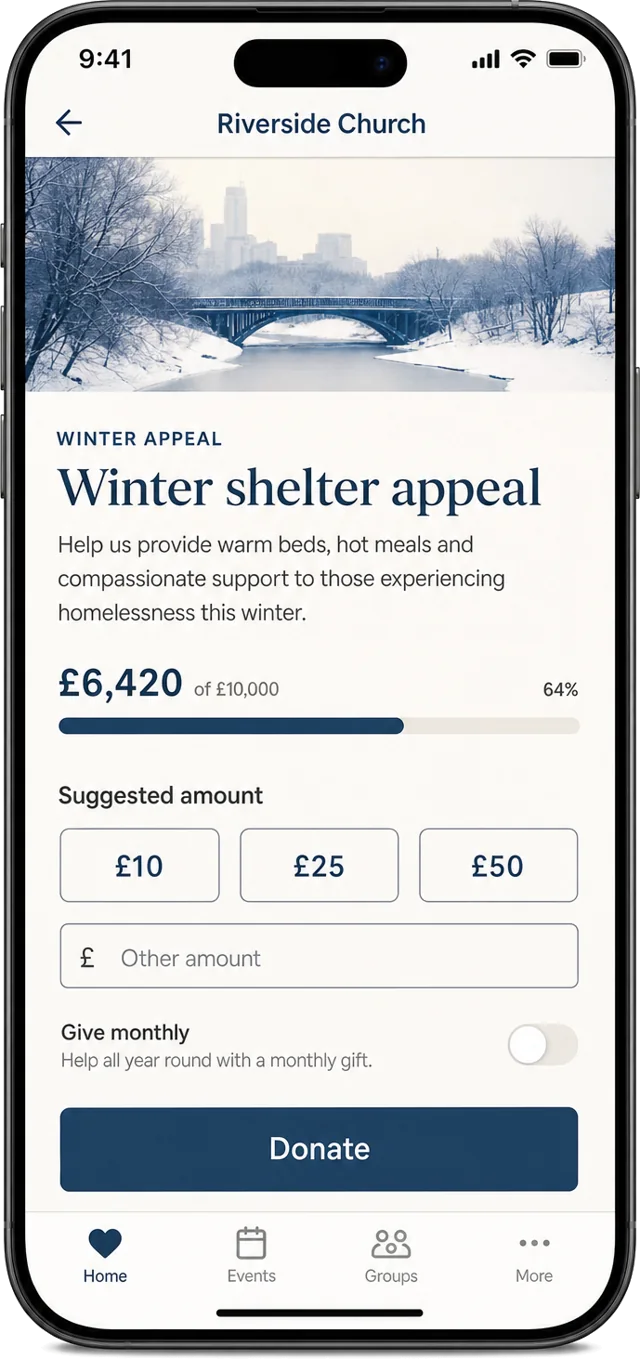
Giving that takes thirty seconds, from the app people already open. Set a campaign and a goal, show progress, and let supporters give once or monthly with a card or wallet. The money goes to your Stripe account with no platform commission.
- Campaigns with goals and a live progress bar
- One-off or monthly giving with Apple Pay and Google Pay
- Optional donor list; 0% commission on paid plans
Included on every plan, including Free. No credit card required.
Donations: the quick answer
- What it is
- One-off and monthly donations through Stripe, with campaign goals, a progress bar and an optional donor list. For churches, charities and causes.
- Cost
- Included on every AppBuild.diy plan, including Free for up to 10 app users. Business is $49/month for up to 1,000 users and Business Pro is $99/month for unlimited users.
- Works on
- Your app on the App Store, Google Play and as an installable web app, from one setup.
- Setup
- Add it in the AppBuild.diy editor and fill in your details. No code.
- Popular with
- Church, Coffee shop, Podcast, Radio station
What donations do for your organisation
Lower the effort of giving, and more people give.
Give in a tap
Suggested amounts and wallet payments remove the friction.
Show momentum
A progress bar turns a target into a shared goal.
Ask at the right moment
A push notification after the service, with the campaign one tap away.
How it works
Set it up once in the AppBuild.diy editor. Your customers get it in the app the same day.
You set it up
- Add DonationsOpen Pages, tap Add Page or Function and choose Donations.
- Create a campaignName, description, goal, suggested amounts.
- Connect StripeDonations can be taken once Stripe is connected; the page shows before that.
- Share progressThe bar updates live; thank donors with a push notification.
Your customers see
- Choose a campaignGoal and progress visible.
- Pick an amountSuggested or custom, once or monthly.
- PayCard, Apple Pay or Google Pay.
- See their impactProgress updates in the app.
Full step-by-step guide with screenshots: AppBuild.diy user guide →
Who uses it
Churches, charities, schools, clubs and community causes.
Included on every plan
- Free for up to 10 app users, then $49/month for up to 1,000
- Works in the web app (PWA), on iOS and on Android
- 0% commission on paid plans
- Unlimited push notifications to go with it
- Switch it on or off from the editor at any time
Works well with
Events & Ticketing
Events with ticket types, registration and QR check-in at the door. Only Stripe's processing fee, not the 6 to 8% a ticketing platform takes.
Social Wall
A members-only community feed inside your app. Members post updates and photos, react and comment, with nothing shown to the public.
Push Notifications
Unlimited push notifications on every plan, including Free, at $0 per message. The lock-screen channel that email and social cannot match.
Donations questions
Is Gift Aid handled?
Donor details are captured for your records; Gift Aid claims are made by you as normal.
Can people give monthly?
Yes. Recurring giving runs through Stripe.
What does it cost?
0% commission on paid plans. Stripe's processing fee applies.
What is Donations in AppBuild.diy?
One-off and monthly donations through Stripe, with campaign goals, a progress bar and an optional donor list. For churches, charities and causes.
Does Donations work on iPhone and Android?
Yes. It works in your app on the App Store and Google Play, and in the installable web app, from the same setup.
Do I need to code to add Donations?
No. You add Donations in the AppBuild.diy editor and fill in your details. Most businesses are live in 5 to 15 minutes.
Which businesses use Donations?
It is popular with Church, Coffee shop, Podcast, Radio station, among others.