Features / Communication
Social Wall
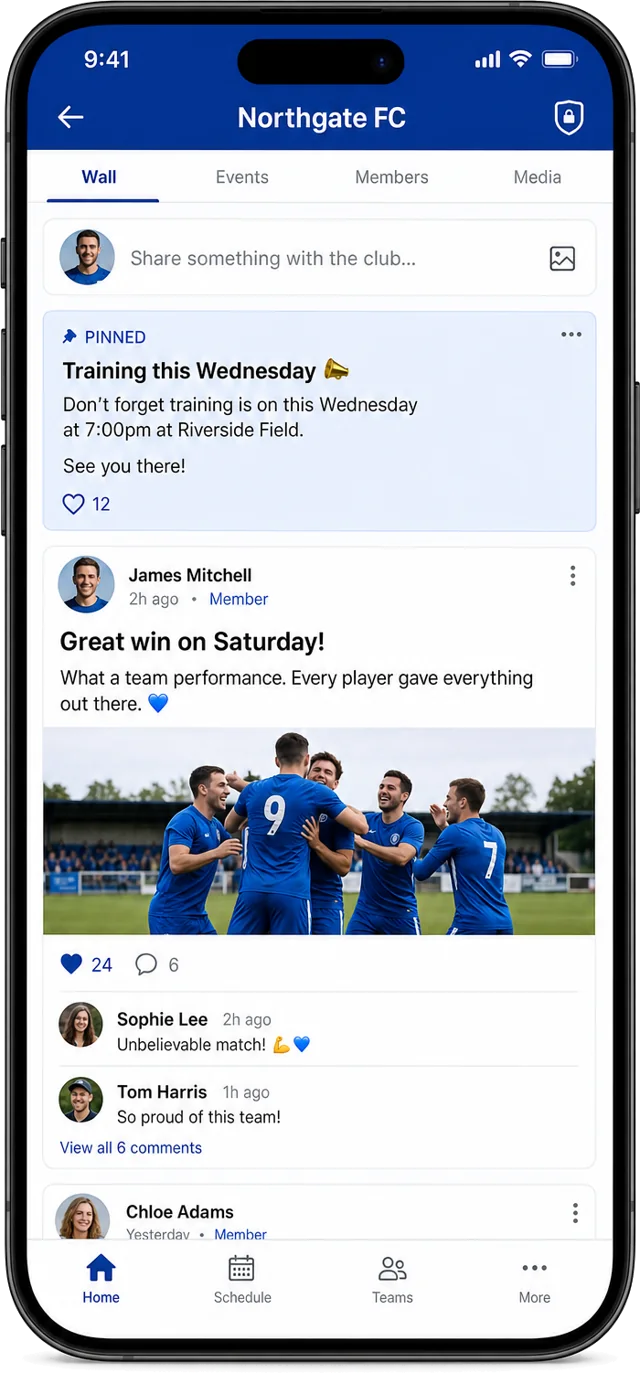
A private feed for your members, with none of the algorithm. Members sign in, post updates and photos, and react and comment. Only signed-in app users can see it, so the club, congregation or community stays its own.
- Members-only: visitors must sign in before they see or post
- Photo posts, reactions and comments
- Post length and accent colour set in the editor
Included on every plan, including Free. No credit card required.
Social Wall: the quick answer
- What it is
- A members-only community feed inside your app. Members post updates and photos, react and comment, with nothing shown to the public.
- Cost
- Included on every AppBuild.diy plan, including Free for up to 10 app users. Business is $49/month for up to 1,000 users and Business Pro is $99/month for unlimited users.
- Works on
- Your app on the App Store, Google Play and as an installable web app, from one setup.
- Setup
- Add it in the AppBuild.diy editor and fill in your details. No code.
- Popular with
- Twitch streamer, YouTuber, Creator, Gym
What a social wall does for your community
The conversation your members already have, in a place you own.
Keep the community in the app
Match photos, prayer requests, class shout-outs: posted where every member sees them.
No algorithm
Posts appear in order, to everyone, every time.
Private by default
Nothing on the wall is visible without signing in.
How it works
Set it up once in the AppBuild.diy editor. Your customers get it in the app the same day.
You set it up
- Add Social WallOpen Pages, tap Add Page or Function and choose Social Wall.
- Allow photo postsOn by default; switch off if you prefer text only.
- Set post limits and colourMaximum post length and an accent colour.
- Create the first postStart the conversation so members see how it works.
Your customers see
- Sign inNew members create an account; no approval wait.
- PostType an update, attach a photo, tap Post.
- React and commentThumbs-up, love, celebrate, and replies that appear straight away.
Full step-by-step guide with screenshots: AppBuild.diy user guide →
Who uses it
Sports clubs, churches, gyms, schools, and membership communities.
Included on every plan
- Free for up to 10 app users, then $49/month for up to 1,000
- Works in the web app (PWA), on iOS and on Android
- 0% commission on paid plans
- Unlimited push notifications to go with it
- Switch it on or off from the editor at any time
Works well with
Messages
One-to-one messaging between you and your app users. Enquiries, support and bookings questions in one inbox, with push alerts both ways.
Events & Ticketing
Events with ticket types, registration and QR check-in at the door. Only Stripe's processing fee, not the 6 to 8% a ticketing platform takes.
Membership Fees
Monthly, yearly or one-off membership tiers paid through Stripe, renewing automatically. For gyms, clubs and communities, with no platform commission.
Social Wall questions
Can the public see the wall?
No. Only signed-in app users can see or post.
Can I moderate posts?
Yes. Remove posts and comments from Data Manager.
Is there a chat room as well?
Yes. Chat Room is real-time group chat; the Social Wall is a feed of posts.
What is Social Wall in AppBuild.diy?
A members-only community feed inside your app. Members post updates and photos, react and comment, with nothing shown to the public.
Does Social Wall work on iPhone and Android?
Yes. It works in your app on the App Store and Google Play, and in the installable web app, from the same setup.
Do I need to code to add Social Wall?
No. You add Social Wall in the AppBuild.diy editor and fill in your details. Most businesses are live in 5 to 15 minutes.
Which businesses use Social Wall?
It is popular with Twitch streamer, YouTuber, Creator, Gym, among others.